

Fix Old PF Account Not Showing in UAN – Step-by-Step 2026 Guide
Old PF Account Troubleshooter
Whatever's causing your old PF account not showing in UAN, tell us the symptom and we'll point you to the exact fix below.
What problem are you facing?
- Your money is safe – an old PF account not showing in UAN almost never means lost funds, only unlinked records that need to be found and reconnected
- EPFO’s new Service History feature (August 2026) shows every employer ever linked to your records
- A separate, government-confirmed trace-and-transfer platform for inoperative accounts now exists (confirmed in the Lok Sabha, 27 July 2026)
- Most transfers between UAN-linked accounts with matching Aadhaar now happen automatically once the new employer’s first contribution is deposited
- If automatic transfer doesn’t apply to you, Form 13 filed online is still the standard manual route
You switch jobs, EPFO issues a new Member ID under your existing UAN, and somewhere between the old employer and the new one, a PF account from three jobs ago simply stops showing up. An old PF account not showing in UAN is one of the most common EPFO complaints in 2026, and it got noticeably worse after this year’s portal upgrade moved things around. The good news, before anything else this is a records problem, not a money problem. The balance is still there, still earning interest, and still recoverable. This guide walks through exactly how to find it, link it, and transfer it – using the actual tools EPFO added in 2026, not just the generic advice repeated on most PF sites.
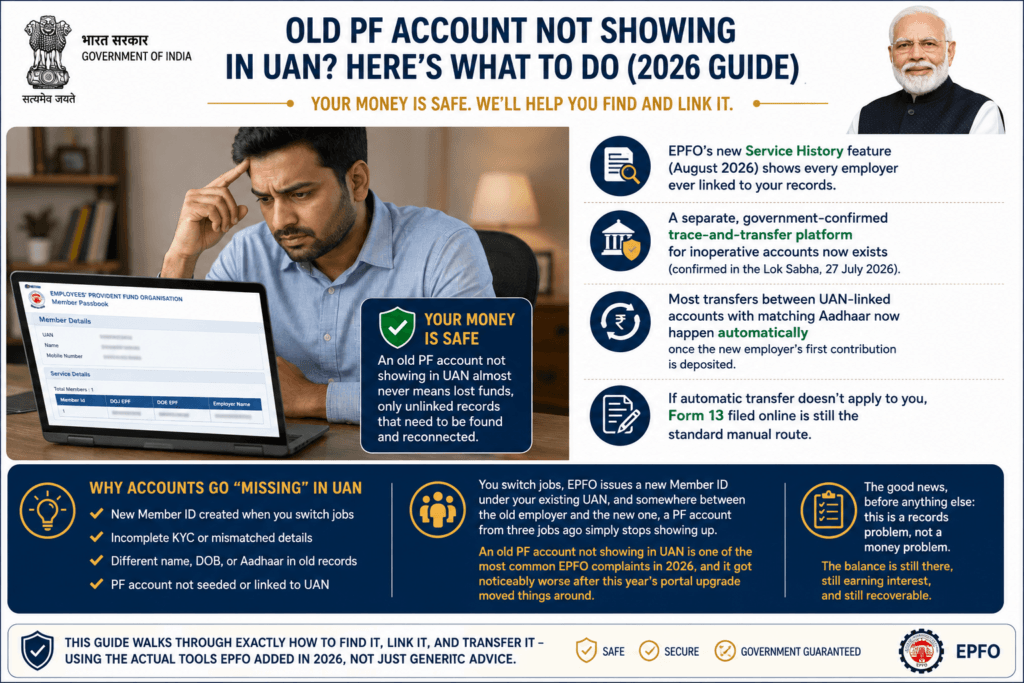
Why Is My Old PF Account Not Showing in UAN?
There are really only a handful of root causes behind an old PF account not showing in UAN, and identifying which one applies to you decides everything that follows.
- Pre-UAN employment: If you started working before UAN existed (pre-2014), an old employer’s records may never have been mapped to any UAN at all
- A new UAN was wrongly generated: Some employers historically generated a fresh UAN for new joinees without checking whether one already existed – leaving you with two UANs and one orphaned account
- Portal display limitation: The 2026 Unified Member Portal upgrade changed how linked employer history is displayed by default – some genuinely linked accounts simply don’t appear on the main dashboard anymore
- Never transferred, never merged: The account exists, is correctly linked to your UAN, but was never transferred into your active Member ID – so it sits quietly, separate from your current balance
- KYC mismatch blocking display: A name, date of birth, or Aadhaar mismatch between the old record and your current UAN can prevent the system from showing the connection
How to Find Your Old PF Account
If your old PF account is not showing in UAN, start here before trying anything else. EPFO’s August 2026 portal upgrade added a feature built specifically for this situation.
Step 1: Check the New Service History Feature
This is the fastest way to resolve an old PF account not showing in UAN.
- Log in to the EPFO Unified Member Portal with your UAN and password
- Look for the Service History tab – this is the new feature added as part of the 2026 platform upgrade
- It displays every employment record associated with you, including older PF accounts that may not appear on your main dashboard
- Note down the Member ID and employer name for any account you don’t recognise as already transferred
Step 2: If Service History Doesn’t Show It, Go Back to the Source
If the old account still doesn’t turn up, your former employer is your fastest path forward. They can retrieve your earlier UAN or Member ID directly through the EPFO Employer Portal, since employer-side records are often more complete than what’s visible to you as a member.
Step 3: No UAN Was Ever Created for the Old Account
If you genuinely never had a UAN for that job (common for pre-2014 employment), use the “UAN Allotment for Existing PF Account” option on the member portal to get one issued retroactively for that specific PF account, which can then be linked and merged.
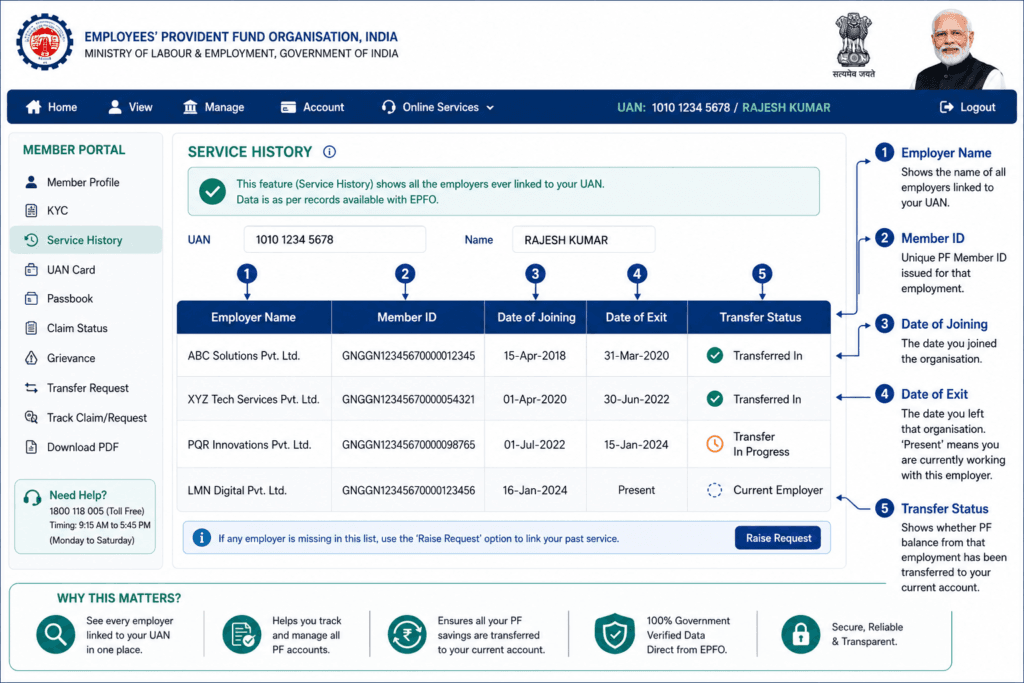
How to Check Whether Your Old Employer PF Is Linked
Finding the account and confirming it’s properly linked are two different checks – an old PF account not showing in UAN on your dashboard doesn’t always mean it’s unlinked. Here’s how to verify linkage specifically.
- On the Unified Member Portal, go to View → UAN Card and download it
- Check whether the old employer’s name and Member ID are listed – if the entry is absent entirely, it isn’t linked
- Compare the Date of Joining shown for your current employer – if it overlaps with or appears to replace an earlier record, the old entry may have been overwritten rather than properly merged
- Open the KYC tab and check for any mismatch flags on Aadhaar, PAN, name, or date of birth – these commonly block a correctly-existing account from displaying as linked
- Search your old payslips or offer letters for a different UAN or PF number – a second, forgotten UAN is a frequent culprit
If everything checks out but the account still won’t display, this typically points to a backend reconciliation delay rather than a genuine data loss – an old PF account not showing in UAN right after a portal migration is worth waiting a few weeks on before escalating.
What to Do If You Have Multiple PF Member IDs
Multiple Member IDs under one UAN is completely normal – that happens with every job change. The real problem, and one common cause of an old PF account not showing in UAN, is multiple UANs, which EPFO does not allow.
Multiple Member IDs, One UAN (Normal)
Use the “One Member – One EPF Account” option under Online Services to merge these. Fill Form 13, verify by OTP, and get your current employer’s approval on the portal – this is standard and usually processes without complication.
Two Separate UANs (Needs Manual Fix)
This is a frequent cause of an old PF account not showing in UAN correctly, and it can’t be merged through the standard online transfer flow. Here’s the actual process:
- Email uanepf@epfindia.gov.in with both UAN numbers, your identity details, and a clear description of the situation
- EPFO verifies the details and blocks the older, unused UAN
- Once blocked, file a fresh Form 13 to transfer the balance from the now-closed UAN’s account into your active, current UAN
- Track progress under Track Claim Status on the member portal
How to Transfer an Old PF Account to Your Current Employer
Once you’ve confirmed why your old PF account is not showing in UAN, the next step is transfer. EPFO’s 2026 system upgrade changed this significantly for a large share of members – many transfers now require no manual paperwork at all.
The New Automatic Transfer (2026 Upgrade)
If your UAN and Aadhaar match perfectly across both your old and new employer’s records, the transfer now happens automatically. As soon as your new employer deposits the first month’s contribution, the backend system merges the old PF account into the new one – no manual Form 13, no employer sign-off step, no physical paperwork.
Manual Transfer (If Automatic Doesn’t Apply)
If your account doesn’t qualify for automatic merging, or you’re linking an old PF account not showing in UAN that you discovered separately, here’s the manual route:
- Log in to the EPFO Unified Member Portal with your UAN and password
- Go to Online Services → One Member – One EPF Account (Transfer Request)
- Select the old Member ID you want to transfer from and your current active Member ID as the destination
- Choose whether your current or previous employer should verify the claim (current employer is usually faster)
- Submit, then verify using an Aadhaar OTP
- The chosen employer approves the request on their end of the portal
- Once approved, EPFO processes the transfer and the balance appears in your active account
- Track the whole process anytime under Track Claim Status
Once your balances are merged, use MoneyOra’s free EPF Calculator to project your combined corpus forward with accurate continuous-service numbers.
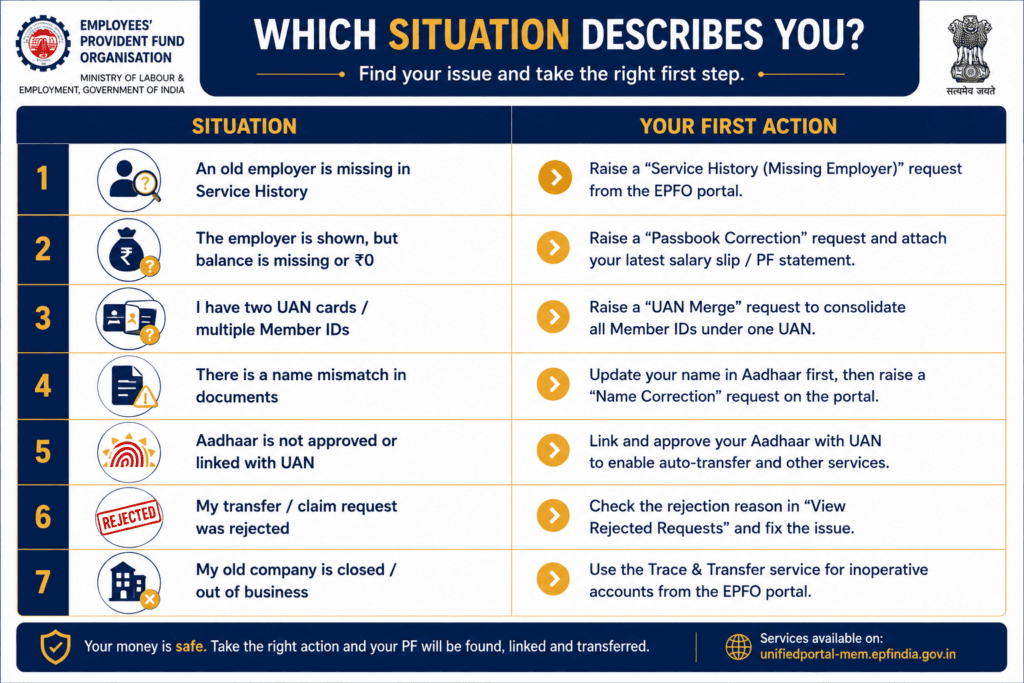
What If the Old Employer Is Closed?
A shut-down company doesn’t mean your PF account disappears with it, even if it results in an old PF account not showing in UAN on your current dashboard – EPFO’s records exist independently of whether the employer is still operating.
- Gather whatever documentation you still have: old salary slips, appointment letter, Form 16, or any document showing the old Member ID or UAN
- If you don’t remember the Member ID at all, the UAN Allotment for Existing PF Account option can still help retrieve it using your Aadhaar and other identifying details
- If the standard online transfer flow fails because there’s no active employer to approve the claim, approach your regional EPFO office directly, in person or by written application, with your identifying documents
- Explain that the employer is closed and you need EPFO-side assistance in verifying and processing the transfer without employer sign-off
There’s no need to panic here – EPFO has established procedures precisely for closed-employer situations, since an old PF account not showing in UAN because the employer shut down is an extremely common scenario across a workforce that changes jobs as often as India’s does.
What If Your Name or Date of Birth Is Different?
This is one of the most common reasons behind an old PF account not showing in UAN. Even a minor spelling difference, a missing middle name, or a date of birth recorded differently by two employers is enough to block automated linking and transfer.
- Go to the KYC or Member Profile section of the Unified Member Portal
- Compare your name and date of birth as they appear against the old Member ID versus your current UAN profile
- Where mismatches exist, submit a correction request with supporting documents – Aadhaar, PAN, and your 10th-standard certificate are commonly accepted for date of birth verification
- Your current employer typically needs to digitally approve profile corrections before they take effect
- Once corrected and matching across all three – old record, current UAN, and KYC documents – retry the transfer or linking request
What If Aadhaar Is Not Linked?
An unlinked Aadhaar is another frequent explanation for an old PF account not showing in UAN. Aadhaar seeding is the backbone of nearly every EPFO digital service introduced since 2026, including the new automatic transfer mechanism and the Aadhaar-based trace-and-transfer platform for inoperative accounts.
- Log in to the Unified Member Portal and check the KYC tab for Aadhaar status
- If it shows as unlinked or unverified, use the Link Aadhaar option and complete OTP verification against your Aadhaar-registered mobile number
- Without a seeded, verified Aadhaar, both the automatic transfer feature and Aadhaar-based account tracing will simply not function for your profile
- Once seeded, allow a few days for the change to propagate through the system before retrying any transfer or search
Confirm your bank account, PAN, and address details are equally current while you’re in the KYC tab – mismatched or outdated details across any of these commonly cause an old PF account not showing in UAN even after Aadhaar itself is sorted.
Old PF Account vs Inoperative PF Account
These two terms get used interchangeably, but an old PF account not showing in UAN and a genuinely inoperative account describe different situations with slightly different implications.
| Aspect | Old / Unlinked PF Account | Inoperative PF Account |
|---|---|---|
| What it means | Account exists but isn’t visibly linked to your current UAN | No contributions received for 36+ consecutive months |
| Does it still earn interest? | Yes, unaffected by linking status | Yes, since a 2016 rule change |
| Can it be withdrawn? | Yes, once linked or via manual claim | Yes, but usually needs extra verification |
| Best next step | Find it via Service History, then transfer | Use the trace-and-transfer platform or file a claim |
In practice, an old PF account not showing in UAN that’s stayed unlinked long enough often becomes inoperative too – so you may be dealing with both labels for the same account. The fix is largely the same either way: locate it, verify KYC, and initiate a transfer or settlement claim.
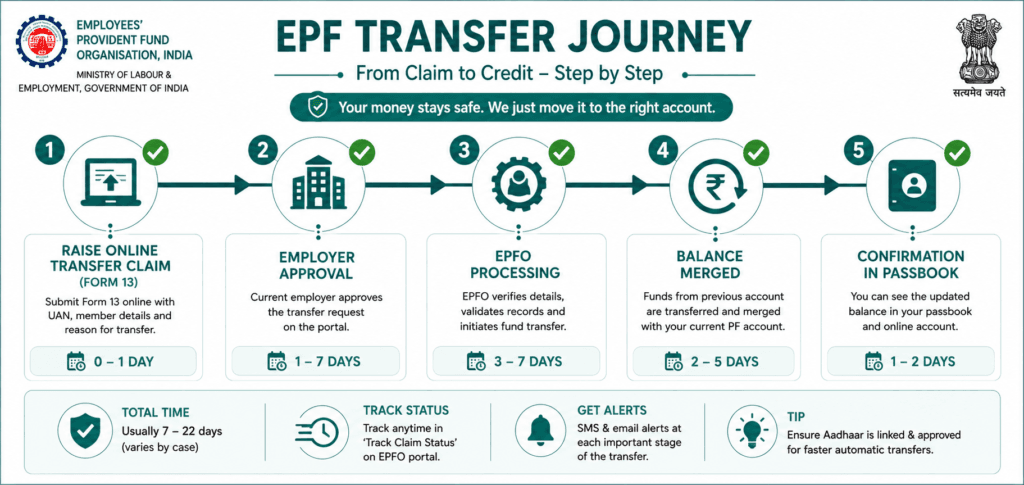
How Long Does EPF Transfer Take?
Once an old PF account not showing in UAN has been located and a transfer request correctly submitted and approved by the relevant employer, EPFO’s own service standard is 15-20 working days for full processing. Delays beyond that are usually traceable to one of a handful of causes.
| Stage | Typical Duration |
|---|---|
| Online transfer claim submitted | Day 0 |
| Employer approval | 1-10 working days (varies widely by employer) |
| EPFO backend processing | Remaining days up to 15-20 total |
| Balance reflects in passbook | 1-3 days after processing completes |
Check progress anytime via Online Services → Track Claim Status. If your claim shows no movement well past 20 working days, that’s the point to move from waiting to actively escalating.
Common EPFO Errors and Their Solutions
Beyond a simple old PF account not showing in UAN, here are the other errors members run into most often, and the fastest fix for each.
| Error / Symptom | Likely Cause | Fix |
|---|---|---|
| Transfer request rejected | KYC mismatch or wrong Member ID selected | Check rejection reason under Track Claim Status, correct KYC, resubmit |
| Claim stuck with no update | Employer hasn’t approved on their end | Follow up directly with HR/EPF-in-charge at the approving employer |
| “UAN already exists” error | A second UAN was generated in error | Email uanepf@epfindia.gov.in to merge/block the duplicate |
| Old account not visible at all | Classic old PF account not showing in UAN case – never linked, or portal display limitation post-2026 upgrade | Check Service History tab; contact old employer for Member ID |
| OTP verification fails | Aadhaar not linked to a currently active mobile number | Update mobile number with Aadhaar first, then retry |
When Should You Contact EPFO?
Most cases of an old PF account not showing in UAN resolve through the portal itself. Reach out to EPFO directly when:
- A transfer claim has shown no status change for more than 20-25 working days
- Your old employer has closed and there’s no one to approve your claim
- You have two UANs and need EPFO to formally block one before you can proceed
- You’ve tried every self-service option and the old account genuinely won’t surface anywhere
Use the EPFO Grievance Portal for a documented, trackable complaint about an old PF account not showing in UAN, or the toll-free helpline for quicker verbal guidance. Keep your UAN, old Member ID, and any supporting documents ready before you contact them – it noticeably speeds up resolution.
Which Situation Describes You? Quick Decision Table
Not every old PF account not showing in UAN has the same cause. Match your exact symptom to the right first step below.
| Your Situation | What to Check First |
|---|---|
| Old employer missing | Previous Member ID via Service History |
| Old PF balance missing | Passbook / transaction history |
| Two UANs | UAN consolidation via uanepf@epfindia.gov.in |
| Name mismatch | KYC/profile correction |
| Aadhaar not linked | KYC status tab |
| Transfer rejected | Claim/transfer rejection reason |
| Employer closed | EPFO grievance / regional office route |
Risks and Limitations to Keep in Mind
Leaving an old PF account not showing in UAN unresolved for too long carries a few real, practical risks worth knowing about.
- TDS on premature withdrawal: Withdrawing an old PF account not showing in UAN instead of transferring it, before completing 5 years of continuous linked service, triggers TDS on the withdrawal amount
- Pension continuity risk: Leaving old accounts unlinked can break the continuous-service record needed to qualify for the EPS pension after 10 years
- Portal transition delays: Some genuinely correct linking or transfer requests may see temporary processing delays as EPFO’s 2026 system upgrade continues to stabilise across regional offices
- Documentation dependency: Closed-employer cases move faster with supporting documents in hand – salary slips, appointment letters, or Form 16 – so keep employment records even after leaving a job
Related MoneyOra Guides and Tools
Once your old PF account not showing in UAN is found and linked, these tools help you make sense of the fuller picture.
- EPF Calculator – Project your combined EPF corpus after transferring old balances
- EPF Interest Credited 2026 – Check current rates and how to verify your updated balance
- EPF Passbook Not Showing Contribution – A related troubleshooting guide for missing contribution entries
- EPFO Profile Photo Update 2026 – Keep your KYC profile fully current, which also helps old-account linking
- SWP Calculator – Plan retirement income once your EPF corpus is fully consolidated
Found Your Old PF Account Not Showing in UAN? Plan Ahead Next
Once your old and current PF accounts are merged, get an accurate picture of your full retirement corpus.
Use the free calculator now on MoneyOra.in →
Official Sources and External References
These are the same official EPFO channels referenced throughout this old PF account not showing in UAN guide.
- EPFO Unified Member Portal
- EPFO Official Website
- EPFO Grievance Management System
- EPFO Member Passbook Portal
Frequently Asked Questions
Why is my old PF account not showing in UAN after changing jobs?
An old PF account not showing in UAN is usually caused by one of: the account was never formally linked or transferred, a name or date-of-birth mismatch is blocking the connection, a second UAN was mistakenly generated, or the 2026 portal upgrade changed how linked history displays on your dashboard. Check the Service History tab first, since it’s specifically designed to surface accounts your main dashboard might not show.
Is my money safe if my old PF account isn’t showing in UAN?
Yes. The balance continues earning interest at the declared EPF rate regardless of whether it’s currently linked or visible. An old PF account not showing in UAN is a records-linking issue, not a loss of funds – you’ll need to locate and formally transfer or claim it, but the money itself isn’t at risk.
How do I find an old PF account without remembering the Member ID?
An old PF account not showing in UAN can still be found even without the Member ID. Check the Service History tab on the EPFO Unified Member Portal first. If it doesn’t appear there, contact your former employer directly – they can retrieve your old Member ID or UAN through the EPFO Employer Portal, even if you have no record of it yourself.
Does EPF transfer happen automatically now?
For many members, yes, following the 2026 system upgrade. If your UAN and Aadhaar match perfectly across both your old and new employer’s records, the transfer processes automatically once your new employer deposits the first contribution – no manual Form 13 needed. If your account doesn’t qualify, the standard manual online transfer process still applies.
What are the latest questions people are asking about old PF accounts in 2026?
What is the EPFO Service History feature?
A new tab on the upgraded Unified Member Portal (added August 2026) that lists every employer record linked to your profile in one place.Has the government confirmed a way to trace old PF accounts?
Yes, in a written Lok Sabha reply on 27 July 2026, the Labour Ministry confirmed a dedicated Aadhaar-authenticated platform exists to trace and either transfer or settle inoperative accounts.Can I transfer an old PF account if my previous employer has shut down?
Yes, via your regional EPFO office directly, using your old Member ID and any supporting employment documents you still have.Why did my old PF account disappear after the EPFO portal update? –The 2026 upgrade changed how linked accounts display by default on the main dashboard; genuinely linked accounts may still exist but not appear until checked via Service History.
Do I lose my pension eligibility if I don’t transfer an old PF account?
Continuous, linked service is what counts toward the 10-year EPS pension eligibility, so leaving old accounts untransferred and unlinked can break that continuity – transferring rather than withdrawing preserves it.


Been playing online for years and this one stands out for its clean layout and honest promotions. I particularly liked the reload offers and how they keep things exciting without requiring crazy wagering requirements. It feels like a site built with actual players in mind rather than just chasing quick signups. cltonybetcasino