

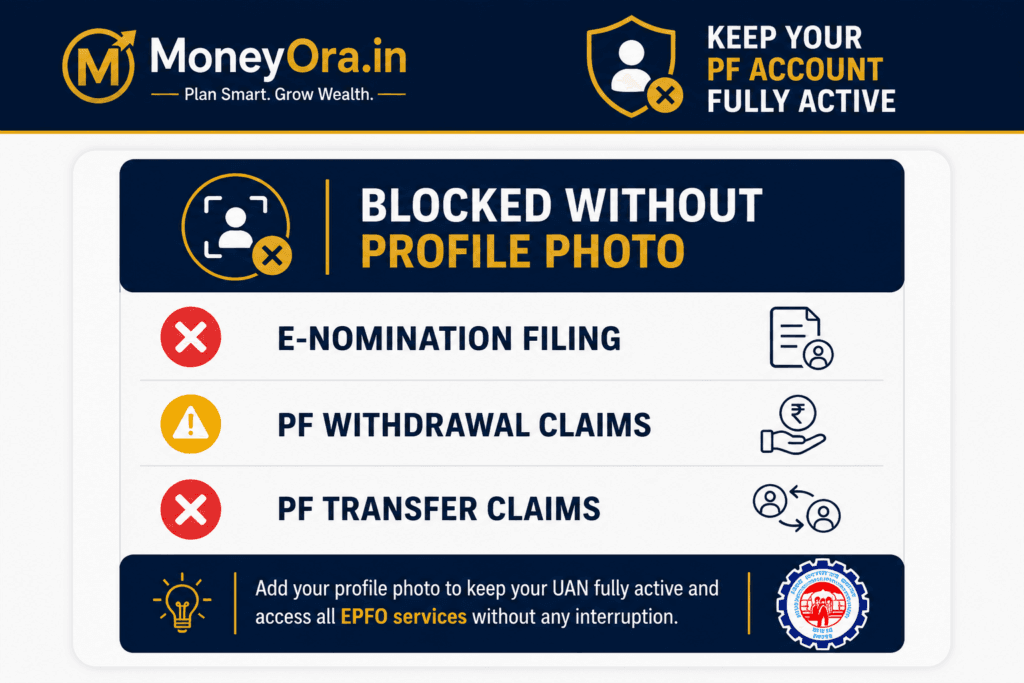
If you’ve logged into your EPFO account recently to file an e-nomination or check your PF balance, you may have run into a message you haven’t seen before: “Unable to proceed — please upload your profile photograph.” This isn’t a glitch. It’s part of a broader EPFO profile photo update push that the Employees’ Provident Fund Organisation has rolled out as part of its ongoing digital infrastructure overhaul in 2026. Check PAN Aadhaar Link Status 2026: Is Your PAN Still Active?
A lot of PF account holders are discovering the need for an EPFO profile photo update the hard way — mid-claim, mid-nomination, or right when they need the money fastest. The good news is that the fix itself takes about five minutes once you know the exact steps and photo specifications EPFO expects. The part that actually matters is understanding why this changed, what it blocks if you skip it, and how to get it right the first time so you’re not stuck re-uploading a rejected photo while a claim sits pending.
This guide walks through the complete EPFO profile photo update process for 2026 from start to finish — the new rules, exact size and format specifications, a step-by-step upload walkthrough, and the most common errors that trip people up. Once your EPFO profile photo update is sorted, you can plan your retirement corpus properly using MoneyOra’s PPF Calculator or check your EPF maturity value with the FD Calculator for comparison.
- Without a profile photo, EPFO’s Unified Member Portal blocks e-nomination filing entirely — you’ll see an “Unable to proceed” error.
- A missing or incomplete EPFO profile photo update can delay PF withdrawal and transfer claim settlement, even if your KYC is otherwise approved.
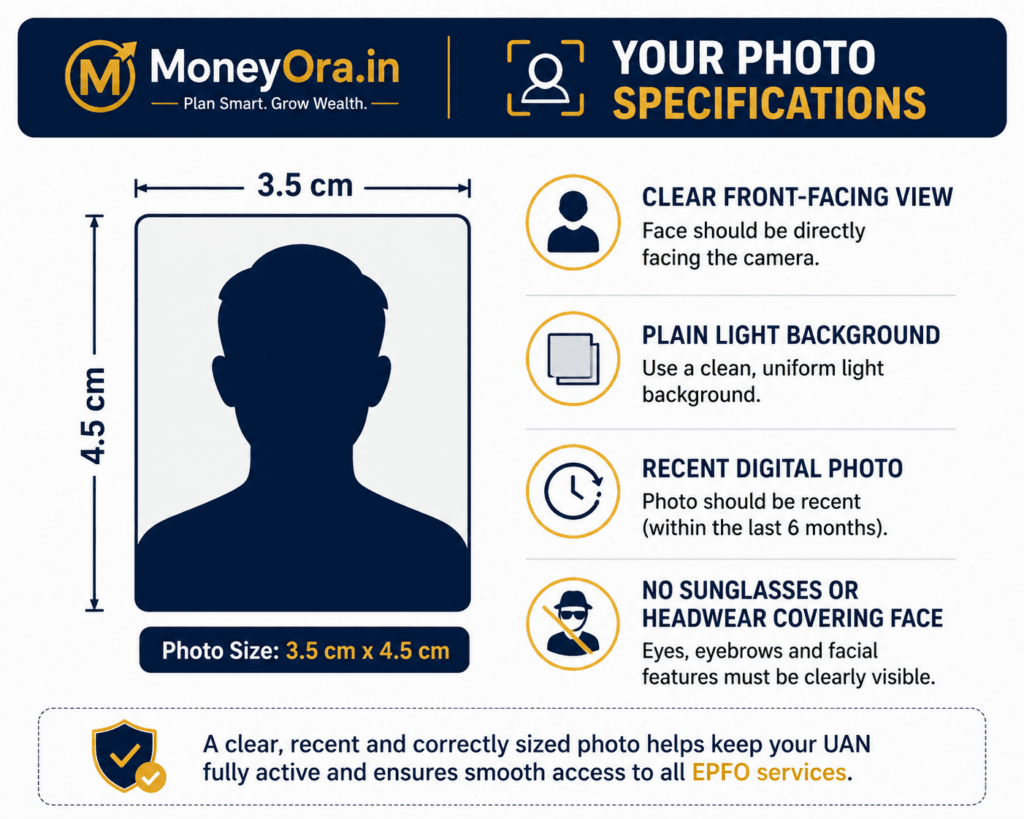
- The photo must be a recent digital photograph, sized to 3.5 cm x 4.5 cm before upload, in a standard image format within the portal’s file size limit.
- Employers cannot upload this photo on your behalf — it must be added directly by the member through the UAN portal login.
- EPFO has also simplified self-service profile updates (name, DOB, gender, parent’s name) for Aadhaar-validated UANs, so it’s worth checking your full profile in one sitting, not just the photo.
Why EPFO Suddenly Made the Profile Photo Update Mandatory
EPFO introduced the mandatory EPFO profile photo update requirement as part of a wider digital infrastructure and centralised database migration aimed at faster member identification, reduced fraud risk, and quicker claim processing. A profile photo helps EPFO verify identity at a glance during e-nomination and claim review, rather than relying solely on document cross-checks.
The bigger digital overhaul behind this change
- Centralised database migration: EPFO has been consolidating member records into a more unified, real-time system, and a complete profile — photo included — is part of what that migration checks for before allowing certain services to proceed.
- Faster identification: According to EPFO’s own guidance, a profile photo helps with quick identification during service requests, even though it isn’t required for every single portal action.
- E-nomination enforcement: E-nomination has been a long-standing EPFO priority since it directly determines who receives PF, pension, and insurance benefits in the event of a member’s death. Making the profile photo mandatory before e-nomination can be filed closes a gap where incomplete profiles were slipping through.
- Fewer document-based rejections: A complete, verified profile — including a clear photo — reduces the back-and-forth of manual document verification that has historically slowed down PF claim settlement.
None of this is optional paperwork for its own sake — the EPFO profile photo update Once your EPFO profile photo update is done, it unblocks services that otherwise sit stuck regardless of how correct the rest of your KYC documentation is.
What Actually Stops Working Without a Profile Photo
This is the part that catches people off guard — the photo requirement isn’t a soft suggestion buried in a settings page. It actively blocks specific, important services.
| Service | Impact Without Profile Photo |
|---|---|
| E-Nomination Filing | Fully blocked — portal shows “Unable to proceed, please upload your profile photograph” |
| PF Withdrawal Claims | Can be delayed if your overall profile isn’t complete alongside a missing photo |
| PF Transfer Claims | Same “Unable to proceed” error can appear when transferring PF between employers |
| General Profile Completion | Profile is flagged as incomplete in EPFO’s system, which can affect processing priority |
Exact Photo Specifications for Your EPFO Profile Photo Update
Getting rejected on the EPFO profile photo update upload usually comes down to one of a handful of formatting issues. Here’s what EPFO actually specifies for the profile photograph:
| Specification | Requirement |
|---|---|
| Photo Source | Taken using a digital camera or a good-quality smartphone camera |
| Photo Size | Restricted to 3.5 cm x 4.5 cm before uploading (standard passport-style dimensions) |
| Background | Plain, light-coloured background recommended — avoid patterned or cluttered backdrops |
| Face Visibility | Clear, front-facing, recent photograph — no sunglasses, no headwear obscuring the face (religious headwear is generally acceptable as long as the face is fully visible) |
| File Format | Standard image formats accepted by the portal (JPEG is the most reliably accepted) |
| Uploader | Must be uploaded by the member directly — employers cannot add this on the member’s behalf |
Beginner trap: Uploading a cropped selfie taken from a group photo. The EPFO profile photo update process expects a proper, individually-taken photograph meeting the size specification — cropped or filtered images from social media are the most common reason uploads get rejected or flagged for re-verification.
Step-by-Step: How to Complete Your EPFO Profile Photo Update
The EPFO profile photo update process takes about five minutes if your photo is already prepared to specification. Here’s the complete walkthrough:
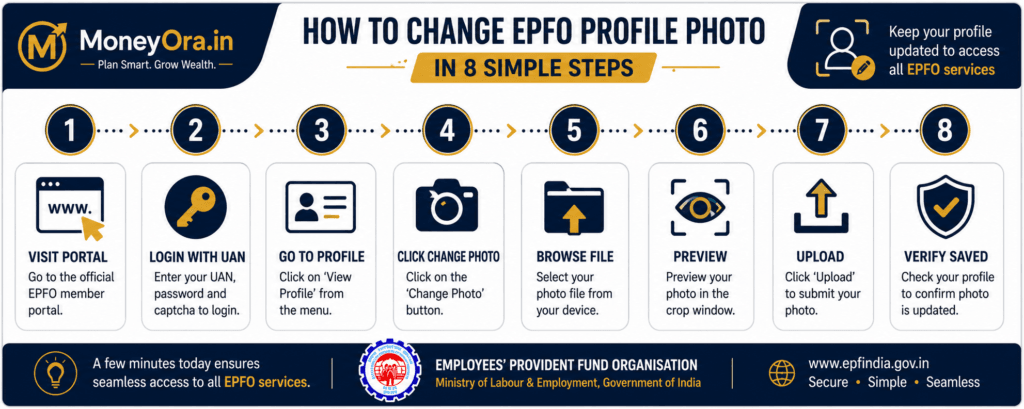
- Go to the EPFO Unified Member Portal. Visit the official portal at unifiedportal-mem.epfindia.gov.in — always use the official EPFO domain, never a third-party link claiming to offer the same service.
- Log in with your UAN credentials. Enter your 12-digit Universal Account Number (UAN), your password, and the captcha code shown on screen, then click Sign In.
- Navigate to the Profile section. Once the dashboard loads, click on the “View” option in the top menu bar, then select “Profile” from the dropdown.
- Click “Change Photo.” On the profile page, look for the “Change Photo” option, usually shown on the left-hand side of the profile section.
- Browse and select your photo. Click “Browse,” locate your prepared photograph (sized to 3.5 cm x 4.5 cm) on your device, and select it.
- Preview before confirming. Use the “Preview” option to check how the photo appears before finalising — this step catches cropping or orientation issues before they cause a rejected upload.
- Click “Upload Photograph.” Once you’re satisfied with the preview, confirm the upload. The photo should then appear on your UAN portal profile.
- Verify it’s visible on your profile. Refresh the profile page or log out and back in to confirm the photo has saved successfully before attempting e-nomination or a claim.
Once your EPFO profile photo update is complete, it’s worth reviewing your overall retirement savings plan. Use MoneyOra’s PPF Calculator to see how your PF and PPF contributions together build your retirement corpus over time.
Common Upload Errors and How to Fix Them
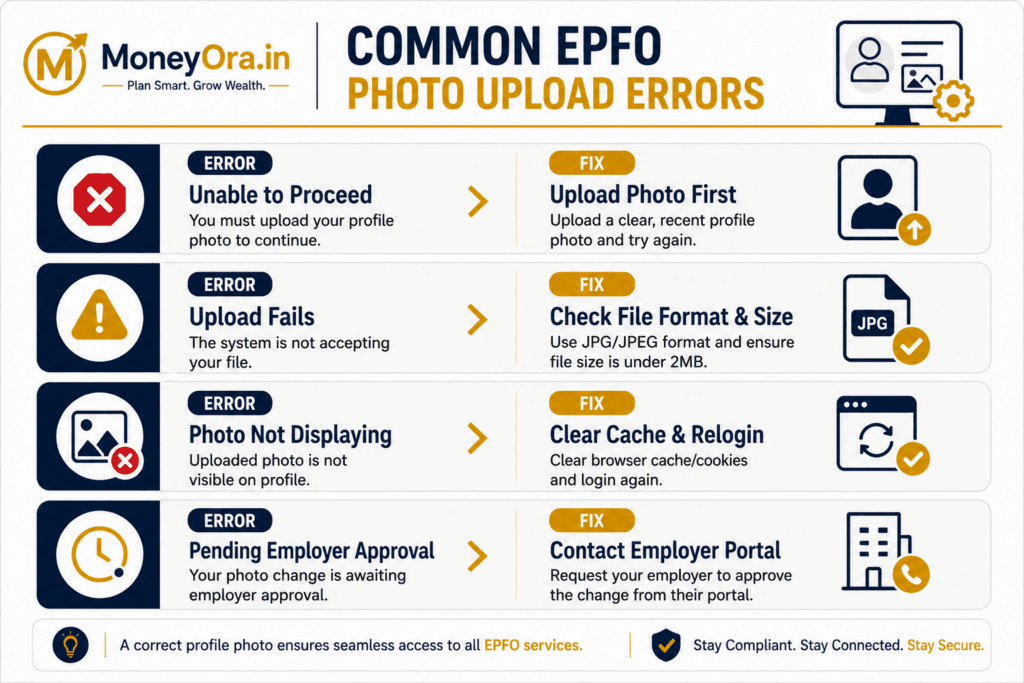
Error 1 — “Unable to proceed, please upload your profile photograph”
This is the exact error most members encounter during their EPFO profile photo update attempt when trying to file e-nomination or process a claim without a completed profile photo. The fix is straightforward: complete the upload steps above before retrying the original action — the portal re-checks profile completeness each time you attempt a photo-gated service.
Error 2 — Photo upload fails or times out
This usually points to a file size or format issue rather than a genuine system fault. Re-save the photo as a standard JPEG, confirm it matches the 3.5 cm x 4.5 cm size specification, and try uploading again, ideally on a stable internet connection rather than mobile data during peak portal traffic hours.
Error 3 — Photo uploads but doesn’t display on the profile
Sometimes the upload succeeds on the backend but the display doesn’t refresh immediately. Log out completely, clear your browser cache, and log back in to confirm whether the photo is actually saved before assuming the upload failed and re-attempting.
Error 4 — “Employer has not approved your photo”
In some cases, particularly for UANs generated before October 2017, certain profile updates require employer certification. If your photo update shows a pending-approval status, it may need your current or last employer to confirm it through their EPFO employer portal login.
Why This Rule Exists Now, and What It Signals
The EPFO profile photo update requirement in 2026 looks like a minor administrative tweak on the surface, but it fits into a much larger pattern: EPFO has been steadily tightening profile completeness requirements across the board, not just for photos. The Labour and Employment Ministry’s earlier move to simplify self-service updates for Aadhaar-validated UANs — allowing members to correct name, date of birth, gender, and parent’s name themselves, without document uploads — points in the same direction: fewer manual verification bottlenecks, more automated, self-serve completeness checks gating access to services.
Read together, these changes suggest EPFO is treating “profile completeness” as a genuine access gate rather than an optional nicety, likely to reduce the volume of claims stuck in manual review queues. A photo, in this context, isn’t primarily about appearances — it’s a data point that speeds up identity verification during e-nomination and claim processing, which is where EPFO has historically faced its biggest processing-time complaints.
For members, the practical takeaway is simple: treat your entire EPFO profile — not just the photo — as something to check and complete now, before you actually need to file a claim or nomination under time pressure. Profile completion, once done, tends to stay done; it isn’t a recurring task, which makes the five minutes required now a reasonable trade against a potential multi-week claim delay later.
Other Profile Details Worth Checking Alongside Your EPFO Profile Photo Update
Since you’re already inside your UAN profile to complete the EPFO profile photo update, it’s efficient to verify these related details in the same sitting:
- Name spelling consistency: Your name on the EPFO profile should exactly match your Aadhaar and bank account records — mismatches are one of the most common causes of claim rejection.
- Date of birth: Confirm this matches your Aadhaar record exactly, including the correct format.
- Nominee details: If you haven’t filed e-nomination yet, do it right after your photo update goes through — this is the single most important pending action for most PF account holders.
- Bank account and IFSC details: Verify these are current, especially if you’ve switched banks recently, since claim settlements are transferred directly to this account.
- Mobile number and email linked to UAN: These are used for OTP verification during claims — an outdated number can lock you out at the exact moment you need portal access most.
Once your EPFO profile photo update and nomination are sorted, it’s worth mapping out your broader retirement plan. Use MoneyOra’s PPF Calculator or SIP Calculator to see how your PF contributions fit alongside other retirement savings instruments.
EPFO Profile Photo Update 2026 — A Five-Minute Task Worth Doing Today
The EPFO profile photo update requirement is a small task in 2026 with an outsized consequence if skipped — it directly blocks e-nomination filing and can slow down PF withdrawal and transfer claims when you need them processed fastest. The fix takes about five minutes: a properly sized digital photograph, a quick login to the Unified Member Portal, and a straightforward upload sequence.
Complete your EPFO profile photo update before you actually need to file a claim, not after — profile completion isn’t something you want to be troubleshooting under time pressure while a withdrawal or transfer sits pending. Once it’s done, it stays done, and you can turn your attention to actually growing what’s in that account.
Review how your PF balance fits into your overall retirement plan. Use the free calculator now on MoneyOra.in.
Plan Your Retirement Savings Alongside Your PF
PPF • SIP • FD • Lumpsum — all free, no login required.
Use the free calculator now on MoneyOra.in →MoneyOra Tools
- PPF Calculator — Plan your long-term retirement savings alongside your EPF
- SIP Calculator — See how consistent monthly investing compounds over time
- FD Calculator — Compare fixed-return options alongside your EPF balance
- Lumpsum Calculator — Project growth on any lump sum PF withdrawal you reinvest
- Income Tax Calculator — Understand tax treatment on PF withdrawals and interest
- Bank Calculators Hub — All banking and savings tools in one place
MoneyOra Articles
- Emergency Fund Planning Guide — Build a safety net alongside your long-term EPF savings
- FD vs Liquid Fund — Where to park a PF withdrawal or transfer amount temporarily
- CIBIL Score for Home Loan — Using your PF corpus alongside a home loan plan
- Personal Loan Eligibility Guide — Compare borrowing against withdrawing from PF for urgent needs
- Education & Personal Finance Category — All MoneyOra guides on savings, loans, and financial planning
Frequently Asked Questions — EPFO Profile Photo Update
Is EPFO profile photo update mandatory in 2026?
Yes, the EPFO profile photo update is mandatory for specific services. It’s mandatory before you can file e-nomination, and an incomplete profile — photo included — can also delay PF withdrawal and transfer claim processing, even if the rest of your KYC is approved.
What size should my EPFO profile photo be?
EPFO specifies the photograph should be restricted to 3.5 cm x 4.5 cm before uploading, taken using a digital camera or good-quality smartphone camera, with a clear, front-facing view and no obstructions to the face.
Can my employer upload my EPFO profile photo for me?
No. The profile photo must be uploaded directly by the member through their own UAN Member Portal login — employers cannot add or update this on a member’s behalf.
Why do I see “Unable to proceed, please upload your profile photograph” on EPFO?
This error appears when you try to access a photo-gated service, most commonly e-nomination filing, without having a completed profile photo on your UAN account. Uploading the photo through the Profile section resolves it.
How do I upload a profile photo on the EPFO UAN member portal?
Log in to the Unified Member Portal with your UAN and password, go to View then Profile, click “Change Photo,” browse and select your prepared photo, preview it, and click “Upload Photograph” to confirm.
Will an EPFO profile photo update delay my PF claim if I skip it?
An incomplete profile, including a missing photo, can contribute to claim processing delays, since EPFO’s system flags incomplete profiles during review. Completing the photo update ahead of filing a claim reduces this risk.
What happens if my EPFO profile photo update upload keeps failing?
Repeated EPFO profile photo update upload failures usually point to a file format or size mismatch rather than a system error. Re-save the photo as a standard JPEG matching the 3.5 cm x 4.5 cm specification and retry, ideally on a stable internet connection.
Can I update other EPFO profile details along with my photo?
Yes. EPFO has simplified self-service updates for Aadhaar-validated UANs, allowing members to correct name, date of birth, gender, nationality, and parent’s name themselves without document uploads, except in certain cases involving UANs issued before October 2017.
Is it safe to update my EPFO profile photo through a third-party website or agent?
No. The profile photo and any other UAN details should only be updated through the official EPFO Unified Member Portal. Never share your UAN password or OTP with any third party claiming to update your profile on your behalf.
Does the EPFO profile photo update affect my pension or insurance benefits?
Indirectly, yes — since a completed profile photo is required before e-nomination can be filed, and e-nomination is what determines who receives your pension and EDLI insurance payout. Skipping the photo update means your nomination cannot be filed at all.


Pingback: Personal Loan Eligibility: Salary, Age & CIBIL Require 2026
Pingback: FD vs Liquid Fund: Best Returns & Tax Compared 2026
Pingback: How to Build a ₹10 Lakh Emergency Fund in India - MoneyOra
Pingback: CIBIL Score for Home Loan: Best Numbers for 2026