
Mortgage Calculator
Calculate monthly payment, total interest, PMI, taxes, amortization & compare loan scenarios — completely free.
ratio
| Year | Opening Balance | Principal Paid | Interest Paid | Total Paid | Closing Balance |
|---|
| Month | Payment | Principal | Interest | PMI | Balance |
|---|
| Parameter | Loan A | Loan B | Winner |
|---|
| Year | Regular Balance | With Extra Pay | Difference Saved |
|---|
| Year | Monthly Balance | Bi-Weekly Balance | Savings So Far |
|---|
| Parameter | Current Loan | Refinanced Loan | Change |
|---|
| Scenario | Home Price | Loan Amount | Monthly Payment | DTI Ratio |
|---|
Mortgage Calculator: Best Ways to Plan Your Home Loan in 2026

You found a house you love. The price looks right. The location is perfect. But the one question nobody answers clearly is: what will this actually cost me every month? That is exactly what a mortgage calculator solves in about ten seconds. “how much home loan your salary actually supports”
A mortgage calculator takes three numbers — your loan amount, the interest rate, and how many years you want to repay — and gives you your monthly instalment instantly. No guesswork, no waiting for a bank call back, no sales pressure. Just the real number, right in front of you.
In this guide you will learn how a mortgage calculator works, why the formula matters, how tenure and interest rate affect your total cost, and seven practical ways to use the tool before you ever sit across from a lender. Whether you are buying your first home in Mumbai, refinancing a property in New York, or just trying to understand how much house you can actually afford, these steps will help you borrow smarter. “how your credit score affects your mortgage rate”
Key Takeaways
- A mortgage calculator uses a standard amortization formula: EMI = [P × r × (1+r)^n] ÷ [(1+r)^n − 1]
- Increasing tenure reduces EMI but raises total interest paid — sometimes significantly
- Even a 0.5% drop in interest rate can save lakhs over a 20-year loan
- Down payment size directly affects how much you need to borrow
- Running multiple scenarios before applying is the most underused money move in home buying
What Is a Mortgage Calculator?
A mortgage calculator is an online tool that calculates your monthly repayment — commonly called an EMI (Equated Monthly Installment) — on a property loan. You enter three values: the principal amount you are borrowing, the annual interest rate your lender offers, and the repayment tenure in years or months. The calculator does the math and tells you exactly how much you owe every month.
What makes these tools genuinely useful is the speed. Running the same calculation manually on paper takes real effort; the formula involves exponents and does not simplify nicely. The calculator does it in a fraction of a second, and more importantly, it lets you test dozens of scenarios before you commit to anything.
Beyond the EMI, a good mortgage calculator also shows you the total interest payable over the loan’s life and the total amount you will have paid by the end. That number — total repayment — is often a shock. On a ₹50 lakh loan at 9% for 20 years, your total outflow is close to ₹1.08 crore. Knowing this upfront changes how you approach the negotiation with your bank.
According to the Reserve Bank of India, home loans are the largest retail credit segment in the country, making up over 50% of total bank retail advances. That means millions of people are making this decision every year — many without fully understanding the math behind their EMI.
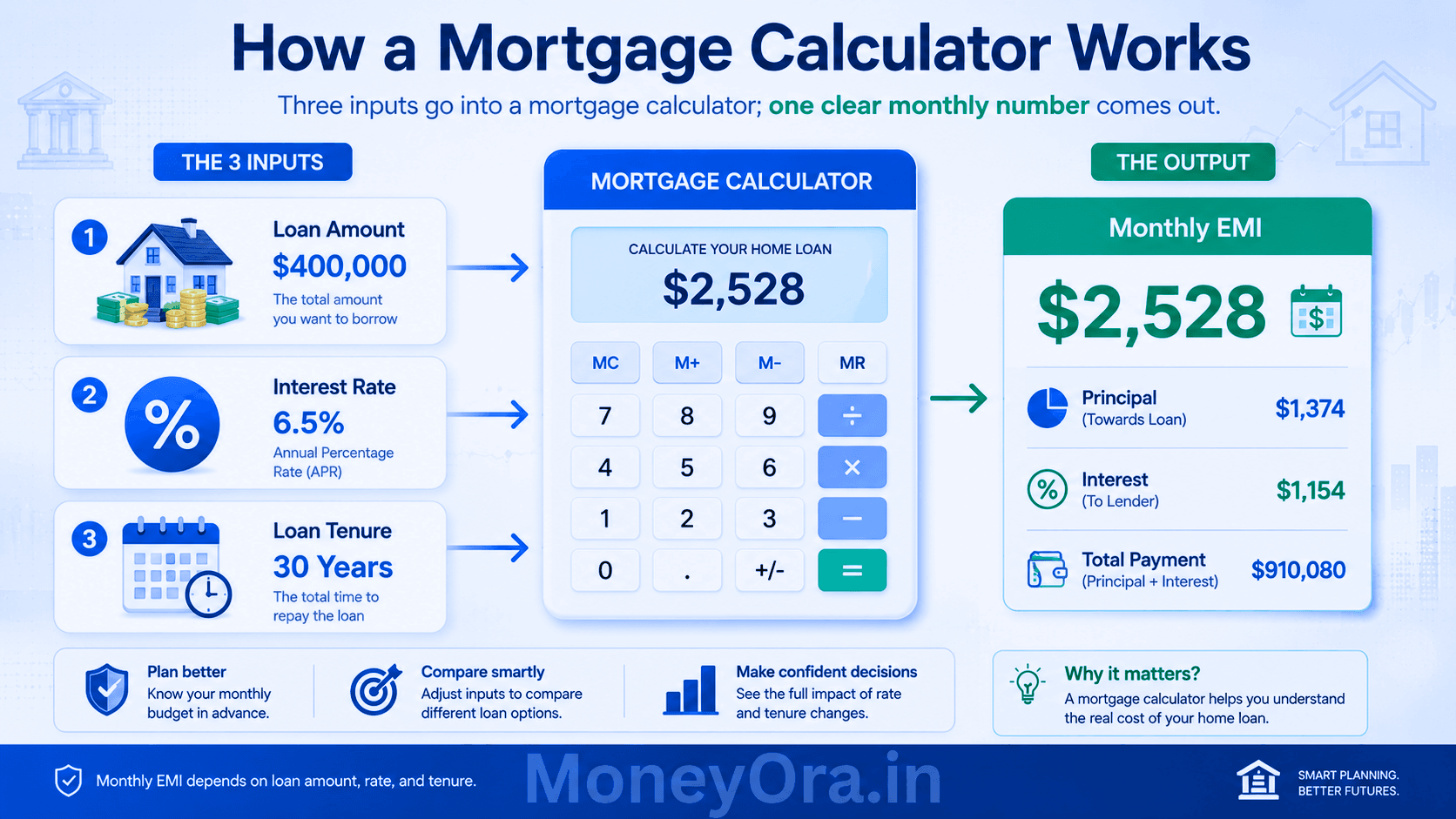
The Mortgage Formula Explained Simply
You do not need to memorize this to use a mortgage calculator, but understanding it helps you trust the output. The formula is:
EMI = [P × r × (1 + r)n] ÷ [(1 + r)n − 1]
Where:
- P = Principal loan amount (the amount you borrow)
- r = Monthly interest rate = Annual rate ÷ 12 ÷ 100
- n = Total number of monthly instalments = Tenure in years × 12
Let’s try a real example. Suppose you borrow ₹40,00,000 at 8.5% annual interest for 20 years.
- P = 40,00,000
- r = 8.5 ÷ 12 ÷ 100 = 0.007083
- n = 20 × 12 = 240
Plug these in and the EMI works out to approximately ₹34,705 per month. Over 240 months, you pay ₹83,29,200 in total — meaning ₹43,29,200 in interest on top of the ₹40 lakh principal. That is why running the numbers before signing anything is so important.
This is the same math used by every bank, every housing finance company, and every mortgage calculator on the web. The formula is standardized, which means any two tools given the same inputs will give you the same EMI.
Fixed Rate vs Floating Rate: Which Changes the Formula?
With a fixed-rate mortgage, r stays the same for the entire tenure. Your EMI never changes. With a floating-rate loan (which is the norm in India), the interest rate adjusts periodically based on the repo rate set by the RBI. When the rate goes up, your EMI can increase. When it falls, you benefit too.
A mortgage calculator typically computes the EMI at the rate you enter today. For floating-rate loans, you should run the calculation at both the current rate and a stressed scenario — say, 1% higher — to make sure the higher EMI still fits your budget.



Rs 1 Lakh Monthly Income After Retirement 2026: The Exact Portfolio Plan

Health Insurance Waiting Period India 2026: 4 Types and 5 Ways to Reduce

Gift Tax India 2026: Is Your Diwali Gift Taxable? (7 Scenarios)

NSE IPO 2026: Issue Price, Dates, Lot Size, Investment Amount and How to Apply
How to Use a Mortgage Calculator (Step by Step)
Using a mortgage calculator takes less than a minute. Here is exactly what to do:
- Enter the loan amount. This is the amount you plan to borrow — not the total property cost. If you are buying a ₹80 lakh house and putting down ₹20 lakh, your loan amount is ₹60 lakh.
- Enter the annual interest rate. Use the rate your bank has quoted or check the current home loan rates. Indian public sector banks were offering rates between 8.40% and 9.15% as of mid-2025 for salaried borrowers with good CIBIL scores.
- Enter the loan tenure. Common choices are 10, 15, 20, or 30 years. A longer tenure lowers your EMI but costs more overall. Pick a tenure where the EMI is no more than 40% of your monthly take-home pay — that is the standard rule of thumb.
- Click Calculate. The tool will show your monthly EMI, total interest payable, and total repayment amount instantly.
- Try different scenarios. Reduce the tenure by five years and see how the EMI changes. Reduce the loan amount by ₹5 lakh (by saving more before buying) and note the savings. This is the most valuable part of using a mortgage calculator — not the first number, but the comparison between numbers.
You can use our home loan EMI calculator for a quick calculation tailored to Indian home loan scenarios. For other types of secured and unsecured loans, our general EMI calculator covers car loans, personal loans, and more.
Best Ways to Use a Mortgage Calculator Before Taking a Loan
Most people use a mortgage calculator once to check the EMI and stop there. That is fine, but it leaves most of the tool’s value on the table. Here are seven ways to get real mileage from it.
1. Check Your Borrowing Capacity Before Approaching Any Bank
Before you even call a bank, use the calculator to work backwards. Decide the maximum monthly EMI you are comfortable paying — say ₹30,000. Then try different loan amounts and tenures until the EMI lands at or below ₹30,000. This tells you the maximum loan you should apply for. Walking in with a number already in your head prevents you from being upsold on a larger loan than you need.
2. Compare Two Banks Side by Side
Bank A offers 8.5%. Bank B offers 8.75%. On a ₹50 lakh loan for 20 years, the difference in monthly EMI looks small — roughly ₹780. But over 240 months, that adds up to about ₹1.87 lakh in extra interest paid to Bank B. The mortgage calculator makes this comparison immediate and concrete.
3. Understand the True Cost of a Longer Tenure
Banks often suggest longer tenures because a lower EMI looks more affordable. On a ₹40 lakh loan at 8.5%, extending the tenure from 15 years to 25 years cuts the EMI from around ₹39,400 to about ₹32,200 — a saving of ₹7,200 per month. But you pay an additional ₹25+ lakh in total interest. The mortgage calculator shows this tradeoff instantly.
4. Calculate the Impact of a Larger Down Payment
If you can stretch the down payment from 10% to 20%, your loan amount drops and so does every number that follows — EMI, total interest, and total repayment. Run the calculation at both down payment levels. The difference is often enough to justify delaying the purchase by six months to save more.
5. Plan for Prepayments
Got a bonus or increment? Even a single lump-sum prepayment in year 3 of a 20-year loan can cut years off your tenure and save lakhs in interest. While a basic mortgage calculator does not always model prepayments, you can simulate it by reducing the outstanding principal and recalculating for the remaining tenure at the new (lower) balance.
6. Test a Stress Scenario: What If Rates Rise?
For floating-rate loans, run the mortgage calculator at your current rate and then again at a rate 1.5% higher. If the higher EMI still fits your budget comfortably, you are in good shape. If it strains things, consider a shorter tenure or a smaller loan — because rate hikes are a real possibility in any economic cycle.
7. Decide Between Reducing EMI and Reducing Tenure After a Prepayment
When you make a partial prepayment, most banks give you a choice: reduce the EMI and keep the same tenure, or keep the same EMI and cut the tenure. Financially, reducing tenure is almost always better — you exit the debt faster and pay less interest. The mortgage calculator can model both options and show you the savings in hard numbers.
For people who are also comparing investment options alongside their mortgage planning, our SIP calculator and FD calculator are useful companions. Knowing the returns your money can generate elsewhere helps you decide whether prepaying a loan early or investing the surplus makes more financial sense.

EMI Comparison Table: Loan Amount vs Tenure vs Rate
The table below shows monthly EMI figures calculated using the standard mortgage calculator formula. All amounts are in Indian Rupees (₹). Use these as quick reference points — then fine-tune in the actual calculator for your specific figures.
| Loan Amount (₹) | Interest Rate | 10 Years | 15 Years | 20 Years | 25 Years | 30 Years |
|---|---|---|---|---|---|---|
| 20,00,000 | 8.5% | 24,797 | 19,708 | 17,356 | 16,107 | 15,391 |
| 30,00,000 | 8.5% | 37,196 | 29,562 | 26,034 | 24,161 | 23,087 |
| 50,00,000 | 8.5% | 61,993 | 49,270 | 43,391 | 40,268 | 38,446 |
| 50,00,000 | 9.0% | 63,338 | 50,714 | 44,986 | 41,960 | 40,231 |
| 75,00,000 | 9.0% | 95,007 | 76,071 | 67,479 | 62,940 | 60,347 |
| 1,00,00,000 | 9.0% | 1,26,676 | 1,01,428 | 89,973 | 83,920 | 80,462 |
* Figures are approximate, computed using the standard amortization formula. Actual bank EMIs may vary slightly based on processing fees or rounding.
Notice how the EMI difference between a 20-year and 30-year tenure is actually not huge — roughly ₹4,500–5,500 per month on a ₹50 lakh loan. But the extra 10 years of payments means you are putting in significantly more money overall. Always weigh the comfort of a lower EMI against the total cost the mortgage calculator reveals.
How Interest Rate Changes Affect Your Total Cost
Interest rate is the single most powerful variable in any mortgage calculation. Even a difference of 0.25% to 0.5% compounded over 15–20 years becomes a very large number.
A Concrete Example
Take a ₹50 lakh loan over 20 years. Here is how the total interest changes as the rate moves:
| Interest Rate | Monthly EMI (₹) | Total Interest Paid (₹) | Total Repayment (₹) |
|---|---|---|---|
| 8.00% | 41,822 | 50,37,280 | 1,00,37,280 |
| 8.50% | 43,391 | 54,13,840 | 1,04,13,840 |
| 9.00% | 44,986 | 57,96,640 | 1,07,96,640 |
| 9.50% | 46,607 | 61,85,680 | 1,11,85,680 |
| 10.00% | 48,251 | 65,80,240 | 1,15,80,240 |
Going from 8% to 9.5% on a ₹50 lakh, 20-year mortgage means paying over ₹11.48 lakh more in interest. That is money that could have been invested, built into your retirement corpus, or deployed through our lumpsum calculator to grow over time. Even 0.5% matters — it is worth shopping for the best rate you can get.
How to Negotiate a Better Rate
- Maintain a CIBIL score above 750 — lenders typically offer their best rates to high-score borrowers
- Compare at least three to four lenders using the mortgage calculator before deciding
- Ask your existing bank for a rate reduction if you have been a customer for years
- Consider balance transfer if another lender offers a meaningfully lower rate (usually worth it for a difference of 0.5%+ with 10+ years remaining)
Mortgage vs Home Loan: Is There a Difference?
People use these terms interchangeably, and in everyday conversation that is fine. But technically, there is a small distinction worth knowing.
A mortgage is the legal security arrangement — it is what happens when you pledge your property as collateral against a loan. The lender holds a charge on the property until you repay the debt. A home loan is the product: the money the bank lends you to buy or build a house.
In practice, all home loans in India create a mortgage on the property. So a home loan calculator and a mortgage calculator are doing the same math. The EMI formula, the amortization schedule, the interest calculation — identical.
Internationally, particularly in the US and UK, the term “mortgage” covers the entire product (loan + security). In India, RBI regulations classify home loans under retail lending products, with guidelines on loan-to-value ratios, prepayment charges, and floating-rate reset cycles. If you want to dig into the official guidelines, the RBI’s circular on home loan regulations is worth reading.
Types of Mortgage Loans Covered by a Mortgage Calculator
- Home purchase loan – To buy a ready-to-move or under-construction property
- Home construction loan – Disbursed in stages as construction progresses
- Home improvement loan – For renovation or extension of an existing property
- Loan against property (LAP) – A secured loan where you pledge your existing property
- Balance transfer – Moving your outstanding mortgage to a new lender at a lower rate
For car and personal loans (unsecured borrowing), check the car loan EMI calculator and personal loan EMI calculator — the formula is the same but the rates and standard tenures differ.
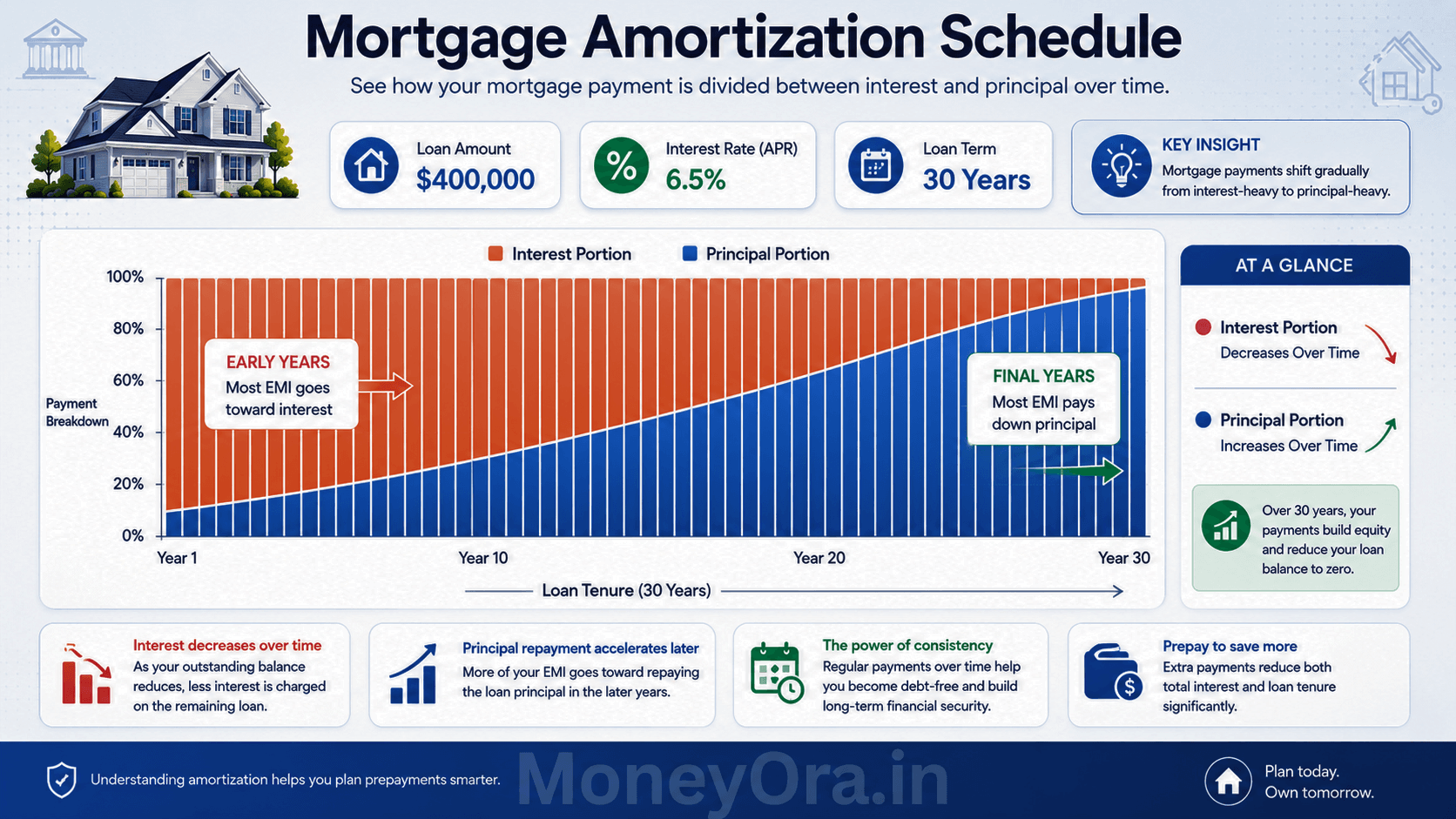
Understanding Amortization: Where Your Money Actually Goes
This is the part most borrowers never look at — and it explains why prepaying early is so powerful.
Every EMI has two parts: interest and principal. In month one, almost all of it is interest. As the loan ages and the principal shrinks, more of each EMI goes toward principal repayment. This progression is called amortization.
On a ₹50 lakh loan at 8.5% for 20 years, here is a rough breakdown of how the EMI (≈₹43,391) splits in early vs later years:
| Month | Interest Component (₹) | Principal Component (₹) | Outstanding Balance (₹) |
|---|---|---|---|
| 1 | 35,417 | 7,974 | 49,92,026 |
| 12 | 34,838 | 8,553 | 49,05,890 |
| 60 (Year 5) | 32,628 | 10,763 | 45,88,474 |
| 120 (Year 10) | 28,271 | 15,120 | 39,65,640 |
| 180 (Year 15) | 20,803 | 22,588 | 29,08,120 |
| 230 (near end) | 3,050 | 40,341 | 4,30,990 |
Notice that in year one, over 81% of your EMI goes to the bank as interest and only 19% reduces what you owe. This flips gradually over the tenure. The practical implication: making a lump-sum prepayment in years one to five has the biggest impact on reducing total interest paid, because the outstanding balance is still high.
Why Early Prepayments Save More
A ₹2 lakh prepayment in year three of a 20-year mortgage at 8.5% saves far more in total interest than the same ₹2 lakh invested in year 15. The reason: that money reduces the high outstanding principal early, which compresses the interest charged on a smaller base across the remaining years. A mortgage calculator with an amortization table makes this visible in seconds.
If you are comparing whether to prepay or invest the surplus, tools like our CAGR calculator, PPF calculator, and NPS calculator help you model the investment side of that decision.
Practical Tips to Reduce Your Mortgage Cost
Beyond just using a mortgage calculator to check the EMI, here are actionable steps to actually lower what you end up paying.
Improve Your Credit Score Before Applying
A CIBIL score of 750 or above qualifies you for the lowest available rate tier at most lenders. Check your score six months before you plan to apply. Pay down any existing credit card balances, avoid multiple loan inquiries in a short period, and make sure all existing EMIs hit on time. That score is worth real money — on a ₹50 lakh loan, moving from 700 to 780 on your credit score can reduce the rate offered by 0.25% to 0.5%, saving you several lakhs over the loan tenure.
Opt for a Shorter Tenure If You Can Afford It
The mortgage calculator already shows you this — but it bears repeating. If the difference between a 15-year and 20-year EMI is manageable for your budget, the 15-year option will save you a significant amount in interest. Revisit the numbers any time your income grows.
Make Annual Prepayments
Even one extra EMI per year — treated as a partial prepayment — adds up. If you receive an annual bonus, routing even half of it toward prepayment consistently over ten years can cut two to three years off a 20-year mortgage.
Compare Home Loan Interest Rates Across Lenders
Most people pick their home loan from the bank where they have a salary account. That is convenient but often not the cheapest option. Use the mortgage calculator to compare exact EMIs across the top three to four lenders after getting quotes. The few hours of comparison work can save more than many years of financial discipline.
Choose the Right EMI Date
This is a small but underrated tip. If your salary credits on the 1st, set your EMI date to the 5th or 7th. That way the payment always comes from a funded account, you never miss a payment, and your credit history stays clean.
Keep an Eye on Balance Transfer Options
If rates in the market fall significantly after you have taken your loan, and your outstanding balance is still high (say, more than ₹20–25 lakh remaining), a balance transfer to a lower-rate lender can make financial sense. Use the mortgage calculator to compare the total interest on your current loan vs the new one, minus processing fees for the transfer.
For those who also invest in stock markets alongside managing their home loan, the stock return calculator and PE ratio calculator on MoneyOra help you evaluate whether surplus cash earns more as a prepayment or as an equity investment.
Related Financial Calculators on MoneyOra
A mortgage is just one piece of your overall financial picture. Here are calculators that work alongside your mortgage planning:
Loan Calculators
- EMI Calculator — Calculate EMI for any loan type with full amortization schedule
- Home Loan EMI Calculator — Specifically built for Indian home loan scenarios
- Car Loan EMI Calculator — Plan your vehicle finance
- Personal Loan EMI Calculator — For short-tenure unsecured loans
Investment Calculators
- SIP Calculator — Compare monthly SIP returns against your loan interest cost
- FD Calculator — Fixed deposit returns to build your down payment corpus
- RD Calculator — Recurring deposit for systematic savings toward a home
- PPF Calculator — Long-term tax-free savings running alongside your mortgage
- NPS Calculator — Retirement corpus planning that complements your housing loan strategy
- EPF Calculator — Calculate your provident fund balance over the years
- SWP Calculator — Systematic withdrawal planning once the loan is repaid
- Lumpsum Calculator — See what a one-time prepayment could grow to if invested instead
- CAGR Calculator — Measure your actual investment returns against borrowing cost
Stock Market Calculators
- Stock Return Calculator — Compare equity returns to your mortgage rate
- Dividend Calculator — Evaluate passive income from dividend stocks
- Brokerage Calculator — Compute trading costs
- Margin Calculator — Understand leverage in equity trading
- PE Ratio Calculator — Evaluate stock valuations
- Stock Average Calculator — Average down your buying price
- Option Price Calculator — Options pricing and hedging
- Position Size Calculator — Manage trade risk
- Stop Loss Calculator — Define your downside limits
Banking Tools
- IFSC Code Finder — Look up any bank branch IFSC code in seconds
- Bank Details Finder — Verify branch details before transferring funds
Conclusion: Use the Mortgage Calculator Before You Use Anything Else
A home loan is one of the largest financial commitments most people will ever make.
The numbers are big, the tenure is long, and small differences in rate or tenure compound into enormous sums over 15–25 years.
A mortgage calculator does not just tell you your EMI — it gives you clarity, negotiating power, and the confidence to make a decision with your eyes open.
Before you visit any bank, run your numbers. Try at least three different combinations of loan amount, tenure, and rate.
Look at the total interest column — not just the monthly EMI. Factor in how a 0.5% rate difference changes the total repayment.
And if you get a bonus, check the amortization table to see exactly how much a lump-sum prepayment in year two or three would save you.
The mortgage calculator is free. The information it gives you is worth far more than any conversation with a loan officer who has their own targets to meet.
Ready to Calculate Your Home Loan EMI?
Use MoneyOra’s free Home Loan EMI Calculator right now — enter your loan amount, rate, and tenure and get your monthly number in seconds. No signup, no ads, no data collection.
Or explore our full EMI Calculator suite for all loan types.
Frequently Asked Questions About Mortgage Calculator
A mortgage calculator is an online EMI tool.
It calculates your monthly home loan payment.
You enter loan amount, interest rate, and tenure.
It uses the standard EMI amortization formula.
Results appear instantly without bank approval.
The calculator is highly accurate.
Most results match bank EMI figures.
Small differences can happen.
Some banks add insurance or processing fees.
Always confirm final EMI with lender.
EMI = [P × r × (1+r)^n] ÷ [(1+r)^n − 1].
P = principal loan amount.
r = monthly interest rate.
n = total monthly instalments.
This is the standard reducing-balance formula.
Yes, it works fully for Indian loans.
Enter loan amount in rupees.
Add your bank's interest rate.
Choose loan tenure in years.
It shows monthly EMI instantly.
In India, both terms are used similarly.
A mortgage is the legal property charge.
A home loan is the lending product.
All home loans create a mortgage.
The EMI calculation remains identical.
Longer tenure lowers monthly EMI.
But total interest becomes much higher.
Shorter tenure increases EMI.
However, it reduces total interest cost.
Prepayment helps reduce long-term burden.
An amortization schedule shows EMI breakdown.
It displays principal and interest monthly.
Early EMIs contain more interest.
Later EMIs contain more principal repayment.
It helps understand loan repayment clearly.
Yes, a larger down payment reduces EMI.
You borrow less money from the bank.
Total interest cost also decreases.
Higher down payment improves loan eligibility.
It may also help secure lower interest rates.