
ITR 4 Total Assets Mismatch: How to Fix Schedule BP E25 Error for AY 2026-27
An ITR 4 total assets mismatch means field E25 (Total Assets) does not match the sum of individual asset fields E18 to E24 in Schedule BP’s Financial Particulars section.
- This is a Category A blocking error the portal will not let you submit your return until it is fixed.
- AY 2026-27 added a new field E18a (Investments) via CBDT notification on March 30, 2026. Most filers who see the mismatch have missed this field.
- E21 (Bank Balance) is now mandatory for all ITR-4 filers from FY 2025-26 onwards.
- If you do not maintain books, you can still fix the mismatch by entering only fields you have data for and balancing E17 with E25 using your proprietary capital as a plug figure.
You filled out your ITR-4 correctly, or so you thought. Then the portal threw an error total assets mismatch. The page would not move forward. If you are a freelancer, consultant, or small business owner filing under presumptive taxation for AY 2026-27, you are likely staring at the Financial Particulars section of Schedule BP wondering what went wrong.
The ITR 4 total assets mismatch is one of the most common errors this season, and it is not because filers are careless. CBDT added a new investment field to the ITR-4 form for AY 2026-27, and most filers and even some software utilities missed it. We will go through exactly what causes this error, which fields to check, and how to fix it step by step.
You can also use MoneyOra’s free financial calculators to cross-verify your business figures before submitting.
What is an ITR 4 Total Assets Mismatch?
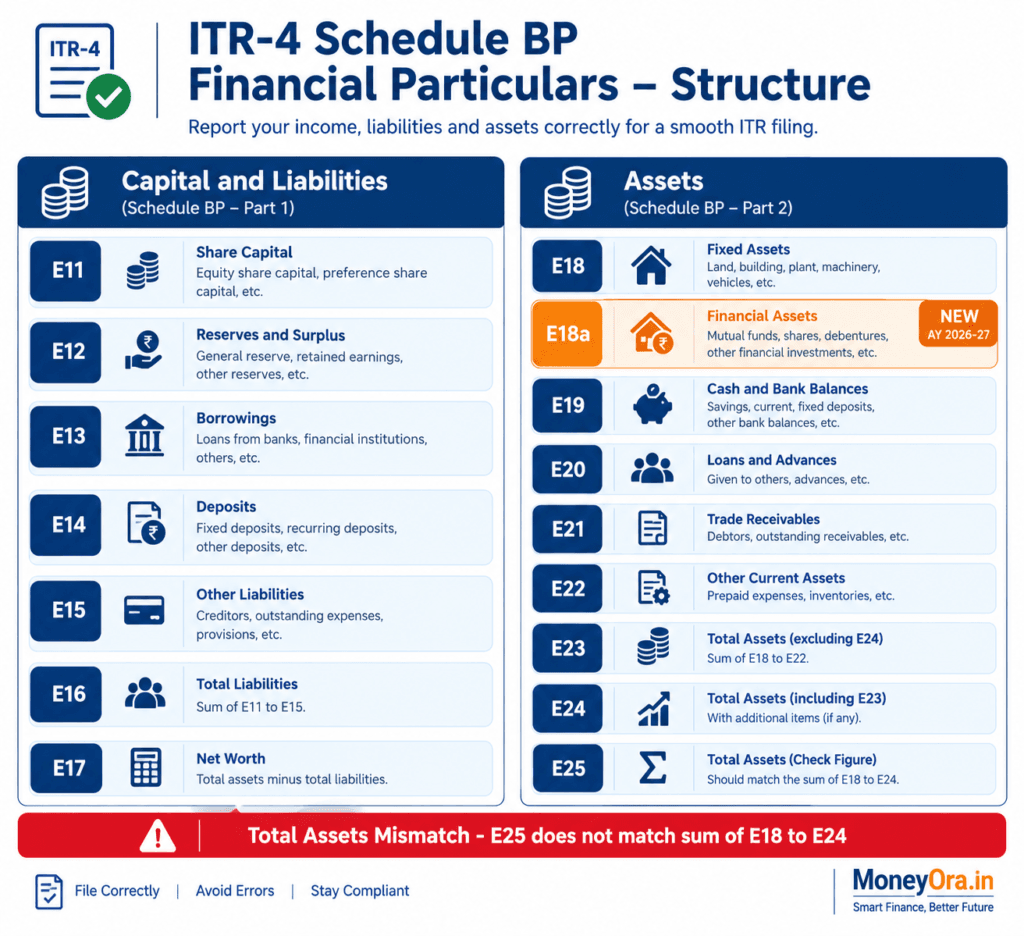
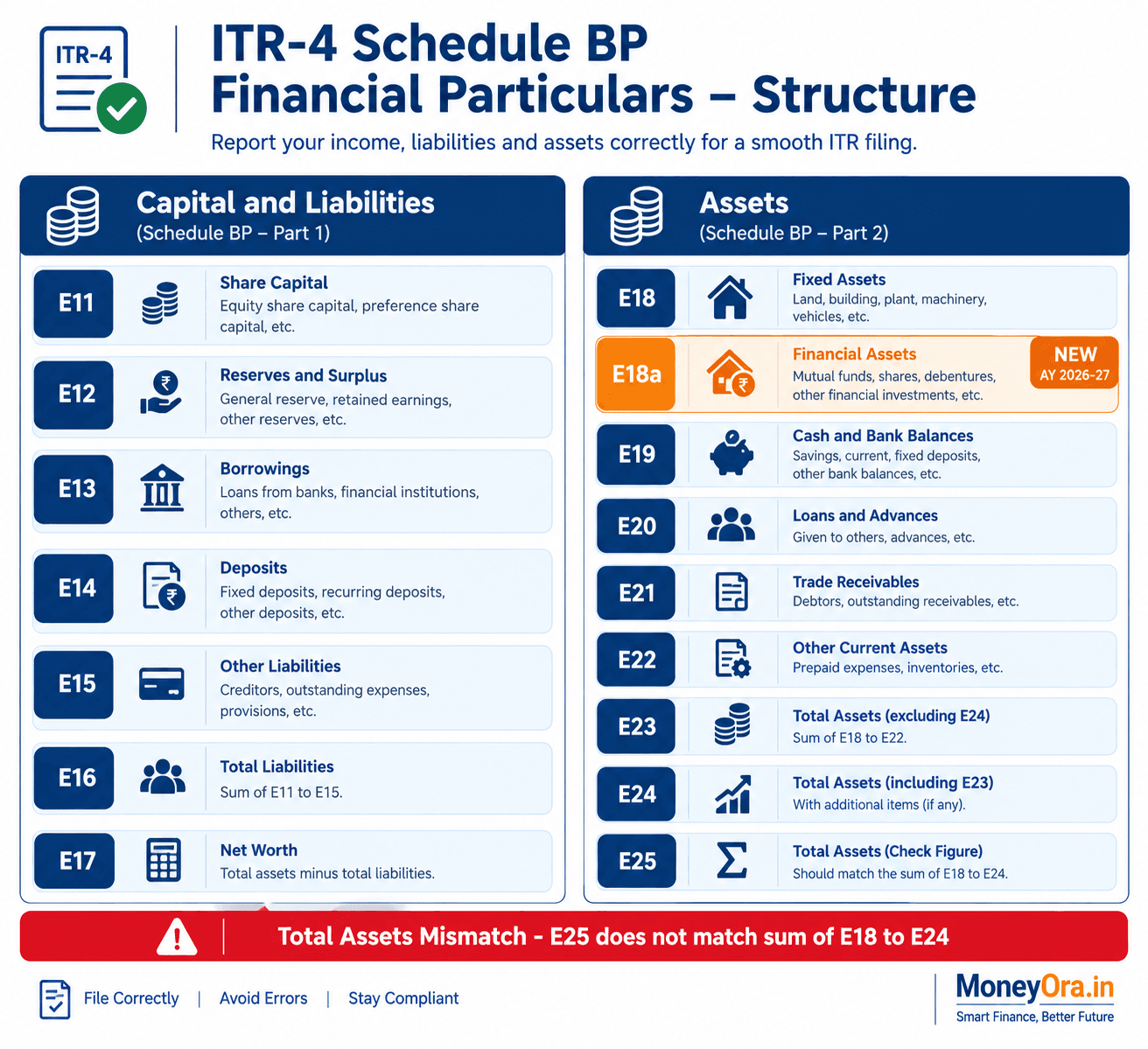
The Financial Particulars section of Schedule BP in ITR 4 is a balance sheet. It runs from field E11 to E25. One side of the sheet records capital and liabilities. The other side records assets. Both sides must balance, like a real balance sheet.
An ITR 4 total assets mismatch error means the portal has detected that field E25, which is Total Assets is not equal to the sum of all asset fields from E18 to E24. The portal’s validation engine checks this automatically. If the amounts do not match the portal blocks the return.
Here is the validation rule from CBDT’s ITR 4 Validation Rules document for AY 2026-27:
“In Schedule BP Total Assets (E25) must equal E18 + E18a. E19 + E20 + E21 + E22 + E23 + E24.”
This is a Category A error. Category A errors block the return. Will not be uploaded until the ITR 4 total assets mismatch is resolved. Category B errors are warnings. Category A errors are stops. The ITR 4 total assets mismatch cannot be worked around.
There is also a validation, on the liabilities side
E17 must equal E11 + E12 + E13 + E14 + E15 + E16.. Critically the portal also checks that E17, which is Total Capital and Liabilities equals E25, which is Total Assets. So both totals must match each other and their respective components.
The Complete E11 to E25 Balance Sheet in Schedule BP Explained
Many people treat this section as optional. It is not – at least not completely. CBDT requires even presumptive taxation filers to report at minimum certain fields. Understanding what each field means is the first step to fixing the ITR 4 total assets mismatch.
The Liabilities Side (E11 to E17)
| Field | What to Enter | Mandatory? |
|---|---|---|
| E11 | Proprietor’s Capital – the total investment you have made in the business including retained profits | Recommended (plug figure) |
| E12 | Secured Loans – loans taken against collateral (property, FD, machinery) | If applicable |
| E13 | Unsecured Loans – personal loans or loans from friends and family used in business | If applicable |
| E14 | Advances from customers – money received in advance before delivering goods or services | If applicable |
| E15 | Sundry Creditors – amounts you owe to suppliers | If applicable |
| E16 | Other Liabilities – anything not covered above | If applicable |
| E17 | Total Capital and Liabilities – must equal sum of E11 to E16 | Auto-calculated |
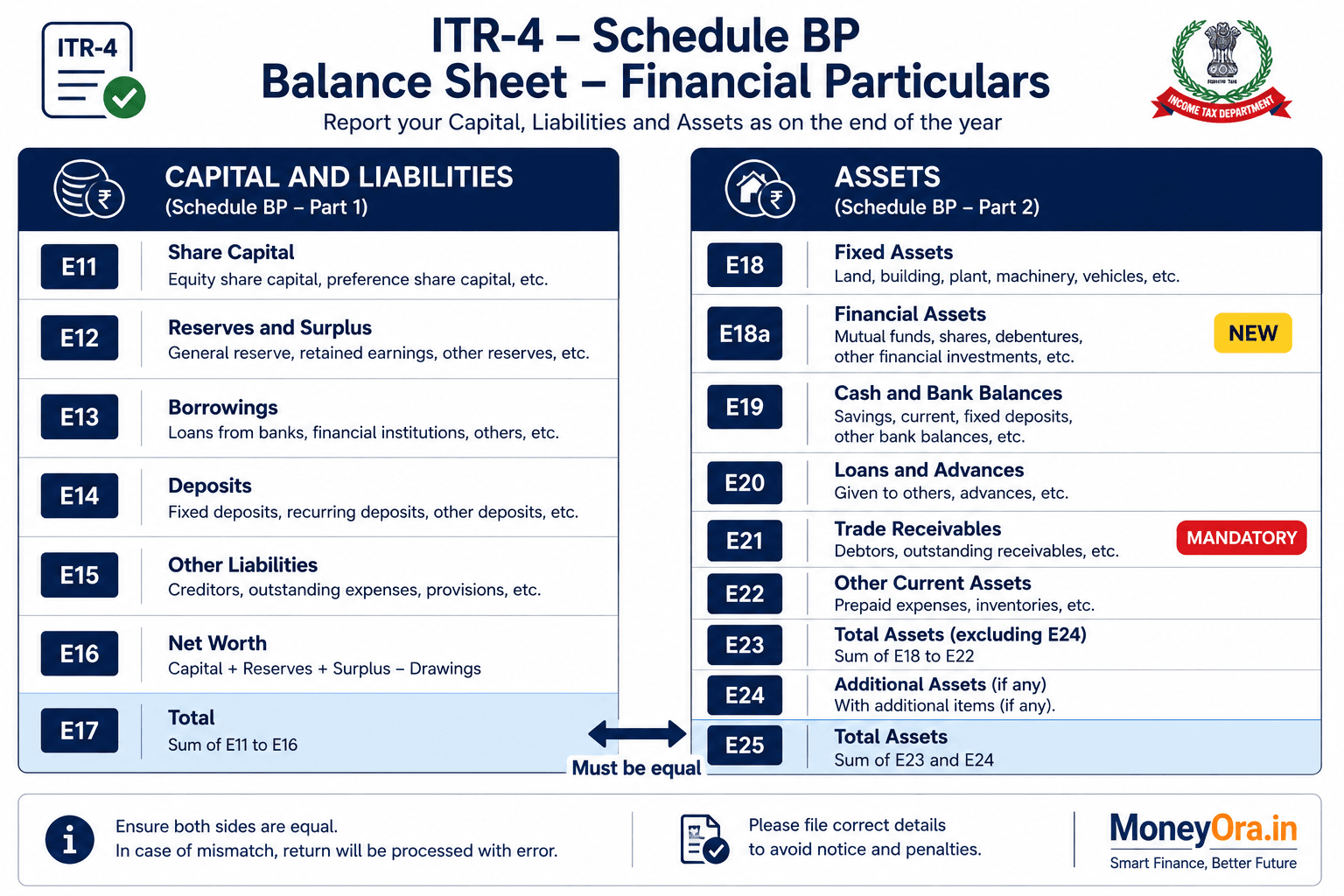
The Assets Side (E18 to E25) – Where the ITR 4 Total Assets Mismatch Happens
| Field | What to Enter | Mandatory? |
|---|---|---|
| E18 | Fixed Assets – machinery, equipment, furniture, computers used in business | If applicable |
| E18a | Investments – NEW for AY 2026-27. Business investments in mutual funds, shares, FDs from business funds as on March 31, 2026 | If applicable – but THIS is where most ITR 4 total assets mismatches originate |
| E19 | Closing Stock – value of goods remaining unsold at year end | If applicable |
| E20 | Sundry Debtors – amounts receivable from customers | If applicable |
| E21 | Balance with Banks – your business bank account balance as on March 31, 2026 | Mandatory from FY 2025-26 |
| E22 | Cash in Hand – physical cash held as on March 31, 2026 | Recommended |
| E23 | Loans and Advances given – amounts you have lent to others | If applicable |
| E24 | Other Assets – anything not covered above | If applicable |
| E25 | Total Assets – must equal E18 + E18a + E19 + E20 + E21 + E22 + E23 + E24 | Auto-calculated / must match |
The ITR 4 total assets mismatch almost always comes from one of these: a missed field (usually E18a), a manual entry error in E25, or an offline utility that has not been updated to include E18a.
The New E18a Field for AY 2026-27 Changed Everything
This is the reason the ITR 4 total assets mismatch is very common in AY 2026-27. CBDT issued an ITR-4 form in a notice on March 30 2026. The main change was adding field E18a “Investments” on the assets side of the Financial Particulars section.
What does this mean for you? If you had money in funds, fixed deposits (funded from your business account) or shares bought with business funds as of March 31 2026 that money must now be shown in E18a alone. Before many people put those amounts in E24 (Other Assets). Did not report them at all. Now there is a field for that.
Many offline JSON tools that were downloaded before April 2026 do not add E18a when they calculate totals. When those tools compute E25 they sum E18 + E19 + E20 + E21 + E22 + E23 + E24. Leave out E18a.. The portal checks totals on the server side and does include E18a. The result is that the totals do not match and you see the ITR 4 total assets mismatch error.
What is counted as an investment for E18a?
The CBDT notice did not give a definition of “investments” which causes real confusion. Using accounting rules the items below belong in E18a:
- Fixed deposits opened from the business bank account (not your personal savings)
- Shares bought with business money
- Mutual fund units in a portfolio that uses business funds
- Any instrument that is not cash a bank balance or a loan given to another person
Personal investments, SIPs or FDs in your own name from personal savings usually do not belong in E18a. Only investments made with business money belong in E18a. If you are not sure ask your CA. A wrong entry in E18a will itself cause a new ITR 4 total assets mismatch if the sum still does not add up.
You can track your investment progress with MoneyOras SIP Calculator or Lumpsum Calculator to keep personal wealth-building separate, from business investments.
6 Common Causes of the ITR 4 Total Assets Mismatch
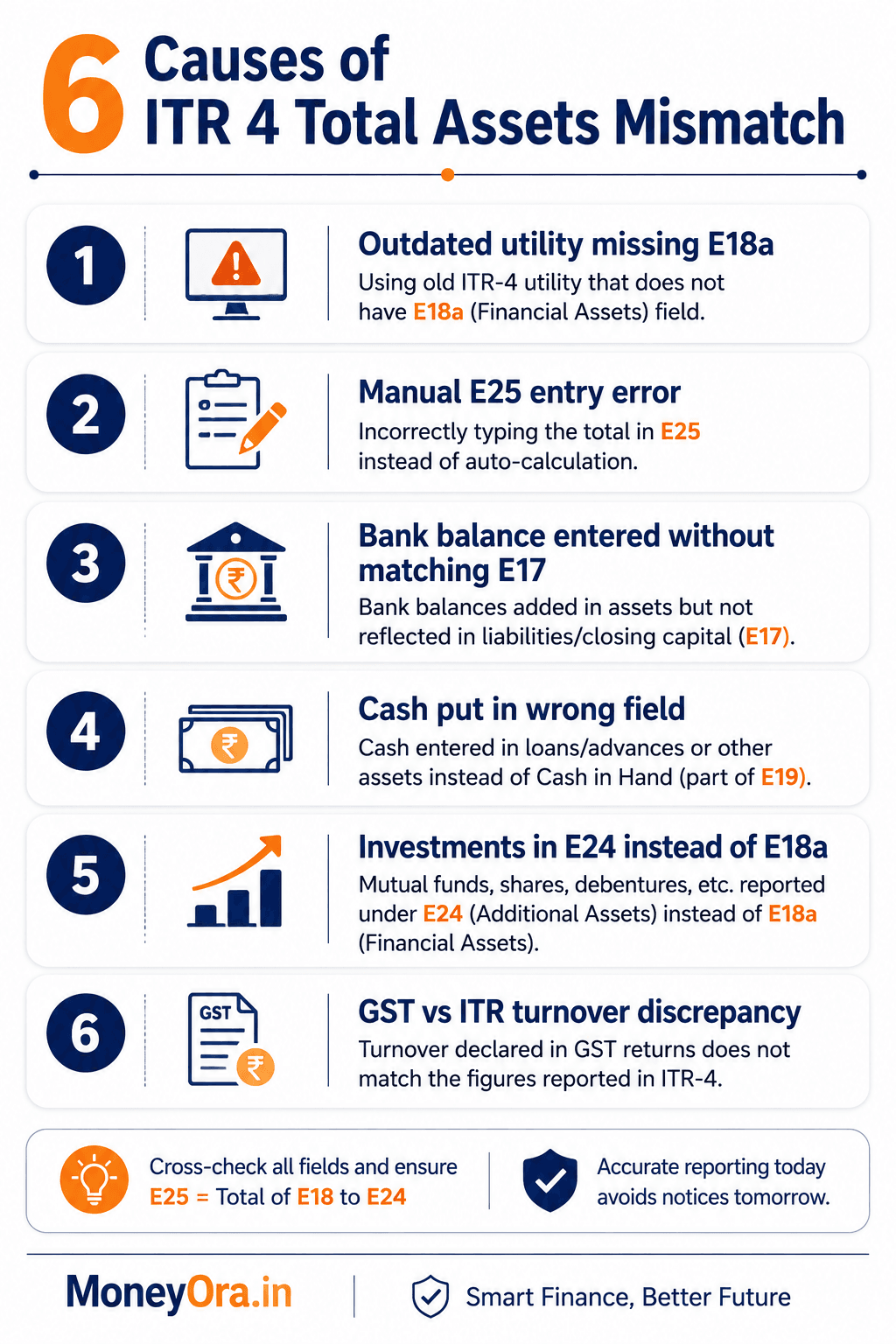
The ITR 4 assets mismatch does not appear randomly. Here are the six patterns that CA clubs and tax professionals are reporting frequently for AY 2026-27:
1. Missing E18a in an offline utility
This is the common reason. If your Excel tool or JSON tool was downloaded before May 2026 it probably does not have E18a. The portal checks for it. Download the version from incometax.gov.in before you file. This causes the ITR 4 total assets mismatch.
2. Manual E25 entry does not include E18a
Some people type the E25 total by hand of letting the form compute it. If they add E18, E19, E20, E21, E22, E23 E24. Forget E18a, the hand‑entered E25 will be incorrect. Never type E25 by hand – let the form do the calculation. This will prevent the ITR 4 total assets mismatch.
3. Entering bank balance without matching E17
E21 must be filled. Many people put their bank balance in E21, which goes into the E25 total.. They keep E11 (Proprietors Capital) at zero. Then E25 shows, for example Rs. 1,20,000 (The bank balance) while E17 shows zero. This creates the ITR 4 total assets mismatch on the liabilities side.
4. Cash balance entered in field
Some people put their bank balance in E22 (Cash in Hand) instead of E21 (Balance with Banks). The numbers still add up. E21 is required. Leaving E21 at zero while putting the amount in E22 will pass the sum check but may fail the mandatory field check. This may fail the field check and lead to the ITR 4 total assets mismatch.
5. Investments placed in E24 of E18a
A filer has Rs. 50,000 In an FD from business funds. They put it in E24 ( Assets). When the portal counts E18a in the E25 total but E18a is zero. E24 holds the Rs. 50,000 The total should still add up – unless the tool does not include E18a in its calculation while the portal does. This causes a mismatch on the server side even if the tool shows no error. This is the ITR 4 total assets mismatch.
6. GST turnover vs ITR‑4 turnover discrepancy spills into balance sheet
Some people adjust the balance sheet numbers to match a GST turnover with an ITR‑4 turnover, in an ad‑hoc way. This makes the numbers internally inconsistent. Can fail several validations at the same time, including the ITR 4 total assets mismatch.
Step‑by‑Step Fix for the Schedule BP E25 Mismatch Error
The following guide shows how to resolve the ITR 4 total assets mismatch and avoid making it worse. Follow the steps in order.
Step 1 – Download the utility
Visit incometax.gov.in. Click on Downloads. Choose ITR‑4. Download the Excel or offline JSON utility. Do not download a file than June 2026 because CBDT released corrigendum Notification No. 57/2026 that updated the form. Older utilities will miss these corrections.
Step 2 – List your assets as on March 31 2026
Before touching the form write down on paper or in a spreadsheet what you actually had on March 31 2026. Include:
- The balance in your business bank account as shown on the March 31 statement
- Cash that you keep in the business drawer or wallet
- Closing stock if you sell goods
- Money that customers owe you
- Business investments such as FDs or MFs that come from business funds – put these in E18a
- Equipment or furniture that you bought for the business
Step 3 – Fill the assets side (E18 to E24) one field at a time
Enter each asset amount in its field on the assets side (E18 to E24). Do not duplicate an item in than one field. For example if you have a business FD worth Rs. 1,00,000, type that amount in E18a not in E24.
Step 4 – Let E25 auto‑calculate
Do not type a value into E25. Let the form calculate it automatically. If the form does not show a total after you fill in the asset fields the utility you downloaded may be out of date. Update it as described in Step 1. Enter the values again.
Step 5 – Balance the liabilities side to match E25
Make sure the liabilities side equals the total in E25. Look at E17. If E25 shows Rs. 2,50,000 while E17 shows Rs. 0 the numbers do not match. Go to E11, which records Proprietor’s Capital and enter an amount that brings E17 up to Rs. 2,50,000. In this case type Rs. 2,50,000 into E11. E17 will then sum to Rs. 2,50,000. Match E25. The mismatch is resolved.
Proprietor’s Capital is not a figure. It shows the investment you have put into the business. For a proprietor calculate it as all money you have contributed plus any retained profits, minus any amounts you have withdrawn. If you have operated the business for years this figure will be accurate.
Step 6 – Run validation before submitting
Run a validation check before you submit the return. In the portal click the Validate button. In the utility use the built‑in validation feature. Check for any remaining Category A errors. Fix any errors that appear. If the ITR 4 total assets mismatch is gone move on.
Step 7 – Submit and e‑verify immediately
Submit the return. E‑verify it right away. After you submit verify the return using Aadhaar OTP, net banking or a Digital Signature Certificate. An unverified return is treated as if it was never filed. The law allows up to 30 days, for e‑verification. It is best to do it the same day you submit.
How to Fill Financial Particulars Without Books of Accounts
A common misconception is that under presumptive taxation (Section 44AD for businesses, Section 44ADA for professionals, Section 44AE for goods carriage), you do not need to fill the Financial Particulars section at all. That is not true.
You are not required to maintain detailed books of accounts under Section 44AA in most presumptive cases. But the ITR-4 form still asks for a simplified balance sheet summary. And the ITR 4 total assets mismatch can occur even when you have minimal data to enter.
If you have no formal books, here is a practical approach:
- Get your March 31, 2026 bank statement. The closing balance goes in E21. This is mandatory.
- Count physical cash held for business on March 31. Put that in E22.
- If you sold goods, estimate closing stock honestly. Put it in E19.
- Check if any customers owe you money. That goes in E20.
- If you made any business investments (FDs from business funds, business-linked MFs), enter in E18a.
- Add all assets. Let E25 auto-calculate.
- In E11, enter an amount equal to E25 (to keep the balance sheet balanced). This is your proprietory capital.
- E17 auto-calculates. E17 should now equal E25. The balance sheet now validates cleanly.
A few things not to do:
- Do not enter Rs. 50 lakh in E22 (Cash in Hand) if your bank account shows deposits of only Rs. 20 lakh. Unrealistic cash balances raise red flags in AIS cross-verification.
- Do not enter zero everywhere when E21 is mandatory. That will cause a validation failure and may trigger a defective return notice under Section 139(9).
If you are a professional filing under Section 44ADA – say a doctor, architect, or engineer with gross receipts under Rs. 50 lakh – the same logic applies. You need to use your EPF, PPF, or FD calculator to track your overall financial position clearly.
MoneyOra’s PPF Calculator, EPF Calculator, and FD Calculator can help you work out these numbers quickly.
Correct vs Incorrect Entries: Comparison Table
The table below shows real-world filing scenarios and whether each would cause an ITR 4 total assets mismatch.
| Scenario | E21 (Bank) | E22 (Cash) | E18a (Investments) | E25 Total | E11 Capital | E17 Total | Result |
|---|---|---|---|---|---|---|---|
| Correct – only bank balance | 1,20,000 | 5,000 | 0 | 1,25,000 | 1,25,000 | 1,25,000 | Pass |
| Correct – bank + FD investment | 80,000 | 5,000 | 50,000 | 1,35,000 | 1,35,000 | 1,35,000 | Pass |
| Wrong – E18a missing, FD in E24 | 80,000 | 5,000 | 0 | 1,35,000* | 1,35,000 | 1,35,000 | May fail (portal vs utility discrepancy) |
| Wrong – bank filled, E11 at zero | 1,20,000 | 5,000 | 0 | 1,25,000 | 0 | 0 | Fail – E25 and E17 do not match |
| Wrong – all zeros including E21 | 0 | 0 | 0 | 0 | 0 | 0 | Fail – E21 mandatory, defective return risk |
Row 3 note: If the filer puts the Rs. 50,000 FD in E24 (Other Assets) and the utility includes E24 in E25, and the portal also counts E24 in E25, both totals agree. But if the utility’s old version does not include E18a in the auto-sum while the portal expects it in E18a specifically (not E24), a server-side ITR 4 total assets mismatch can occur. To avoid ambiguity, always put investments in E18a.
MoneyOra Analysis: What This Error Really Signals
The ITR 4 total assets mismatch is not just an irritating portal error. It reflects something larger happening in how CBDT is tightening data requirements for presumptive taxation filers.
For years, ITR-4 was genuinely simple. You declared your turnover and took the presumptive income (8% or 6% under Section 44AD, 50% under Section 44ADA). The balance sheet section was almost optional. Most filers left most fields blank and nothing happened.
AY 2026-27 changes this. The mandatory bank balance field. The new E18a investments field. The tighter cross-verification with AIS, GST returns, and TDS records. CBDT is building a more complete financial picture of every presumptive filer. The ITR 4 total assets mismatch error is the mechanism that forces filers to engage with the balance sheet data they previously ignored.
This is not necessarily bad. Freelancers and small business owners who have been filing ITR-4 with minimal thought now have an incentive to actually track their business finances. A simple spreadsheet tracking monthly income, business expenses, bank balance, and major assets takes less than 10 minutes a month to maintain. That spreadsheet will make AY 2027-28 filing trivially easy.
The risk is that filers who do not understand the balance sheet logic will either enter random numbers to clear the error, or enter all zeros. Both approaches create mismatch notices or defective return notices later – a worse outcome than the original ITR 4 total assets mismatch error.
Risks of Ignoring or Guessing the Numbers
Removing this error by typing numbers does not solve the problem. It only postpones the issue.
- Defective return notice under Section 139(9): If CBDT CPC sees that the balance sheet figures do not match your AIS or GST data they will send a return notice. You have 15 days to fix the return. If you miss that 15 days your return will be treated as invalid.
- Scrutiny assessment: cash balances, such as Rs. 40 Lakh cash in hand for a business that turns over Rs. 15 Lakh will trigger human scrutiny. Resolving this scrutiny can be costly and slow.
- AIS cross‑verification mismatches: The AIS for FY 2025‑26 records banking data, large transactions, SFT entries and more. Numbers in E21, E22 and E18a that do not match AIS signals will appear during processing.
- GST vs ITR turnover mismatch notices: GST‑registered filers face a scrutiny risk if their GSTR‑1 turnover does not match E1 or E3 in Schedule BP. This mismatch is validated separately.
The honest fix for an ITR 4 assets mismatch is always the right fix. Enter the numbers. If you do not know your March 31 bank balance obtain the statement. It takes five minutes.
For tracking EMI obligations on any business loans you may have which would show up as liabilities, in E12 or E13 MoneyOra’s EMI Calculator can help you keep an eye on balances.
The ITR 4 total assets mismatch for AY 2026-27 is solvable. Most people who encounter this error are dealing with one of two things: either an outdated filing utility that does not include the new E18a field, or a balance sheet where assets have been entered but the matching liabilities (specifically Proprietor’s Capital in E11) have not been updated to match.
The fix is not complicated. Download the latest utility. Enter real numbers in the asset fields. Let E25 auto-calculate. Adjust E11 to balance E17 with E25. Validate and submit.
What this error is really telling you is that CBDT wants a more complete financial picture from presumptive taxation filers going forward. That is not unreasonable. A simple habit of recording your business bank balance, cash, and major assets once a year on March 31 will make this section trivial for every future filing.
Avoid the shortcuts. Do not enter random numbers to clear the ITR 4 total assets mismatch error. That creates a different, more serious problem later. Enter real figures, keep the balance sheet internally consistent, and your return will process cleanly.
If you want to track your overall tax efficiency, check your return on investment across different instruments using MoneyOra’s CAGR Calculator and NPS Calculator. Smart money management and clean ITR filing go together.
Use the free calculator now on MoneyOra.in
Plan your finances better with MoneyOra’s suite of free financial calculators for India. From FD returns to SIP wealth building – everything you need to make smart money decisions in one place.
Frequently Asked Questions
What is an ITR 4 total assets mismatch error?
An ITR 4 total assets mismatch error means field E25 (Total Assets) in Schedule BP’s Financial Particulars section does not equal the sum of individual asset fields E18 to E24. This is a Category A blocking error under CBDT’s official ITR-4 Validation Rules for AY 2026-27. The portal will not allow the return to be submitted until this is resolved.
Is it mandatory to fill Financial Particulars E11 to E25 in ITR-4?
Not all fields are mandatory. For AY 2026-27, field E21 (Balance with Banks) is mandatory for all ITR-4 filers. However, all fields you do enter must add up correctly. E17 must equal the sum of E11 to E16, and E25 must equal the sum of E18 to E24. Any inconsistency creates a mismatch error.
What is field E18a in ITR-4 AY 2026-27?
E18a is a new field for “Investments” added to the ITR-4 form by CBDT via notification on March 30, 2026. It requires filers to separately disclose business investments held as on March 31, 2026 – such as FDs from business funds, shares, or mutual fund units held in a business context. Many filers who missed this field are seeing the ITR 4 total assets mismatch error.
Will a total assets mismatch in ITR-4 trigger a defective return notice?
Yes. A blocking Category A error like the ITR 4 total assets mismatch prevents submission in the first place. If a mismatch somehow slips through or appears after submission during CPC processing, CBDT will issue a defective return notice under Section 139(9), requiring a corrected return within 15 days.
What should Total Capital and Liabilities (E17) equal in ITR-4?
E17 must equal E11 + E12 + E13 + E14 + E15 + E16. It must also equal E25 (Total Assets). If E25 shows Rs. 1,50,000 but E17 shows zero, adjust E11 (Proprietor’s Capital) to Rs. 1,50,000. This balances the balance sheet and clears the ITR 4 total assets mismatch.
How do I balance E17 and E25 if I don’t maintain books of accounts?
Enter only fields you have data for. Put your bank balance in E21 (mandatory). Add cash in hand to E22. Let E25 auto-calculate. Then set E11 (Proprietor’s Capital) equal to E25 so that E17 matches E25. This practical approach clears the ITR 4 total assets mismatch without fabricating any numbers.
What is the due date for ITR-4 AY 2026-27?
The due date for non-audit ITR-4 filers was extended to August 31, 2026 as per Budget 2026. You can revise a filed return any time before December 31, 2026. Late filing attracts fees under Section 234F. If you are still seeing the ITR 4 total assets mismatch and have not filed yet, fix it before submitting to avoid a defective return.
Can I simply put zero in all fields of Financial Particulars to avoid the mismatch?
No. E21 (Balance with Banks) is mandatory. Leaving it at zero when you have business bank activity is incorrect and can trigger a defective return notice. Taxpayers have received Section 139(9) notices for all-zero balance sheets when the AIS showed actual banking transactions. Always enter the real bank balance in E21.
What if my Total Assets (E25) is more than Total Capital and Liabilities (E17)?
This is the most common presentation of the ITR 4 total assets mismatch. You have assets on the right side (bank balance, cash, etc.) but forgot to put matching capital on the left side. The fix is straightforward: increase E11 (Proprietor’s Capital) by the difference. E11 = E25 – (E12 + E13 + E14 + E15 + E16). This brings E17 in line with E25.
If I have a GST-registered business, what extra care is needed for Schedule BP?
GST-registered filers must ensure the turnover reported in E1 (under Section 44AD) or E3 (under Section 44ADA) matches GSTR-1 turnover for FY 2025-26. A turnover mismatch between GST and ITR-4 is a high-scrutiny trigger. Independently of the ITR 4 total assets mismatch, this turnover reconciliation is critical. CBDT’s CPC cross-verifies these figures during return processing.