Form 168 vs Form 26AS: Tax Year 2026-27 Complete Guide + Free TDS Reconciliation Checker
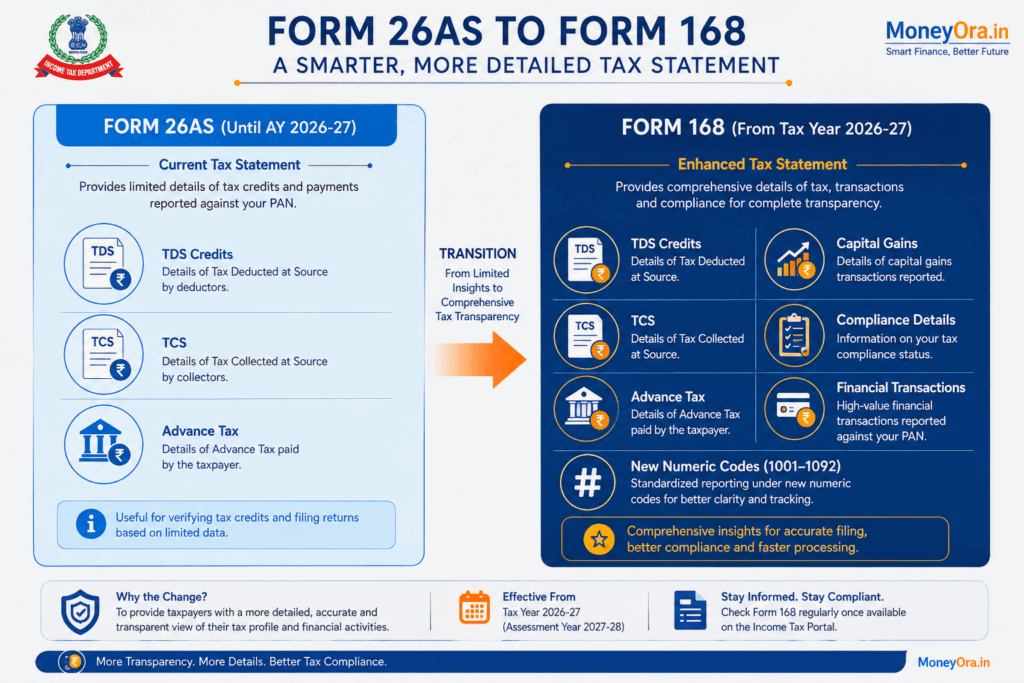
- Form 168 is the new official name for Form 26AS under India’s Income Tax Act, 2025 – effective from Tax Year 2026-27 (April 1, 2026 onwards).
- For your current AY 2026-27 ITR (FY 2025-26 income, due July 31, 2026), you still use the old Form 26AS and AIS – not Form 168.
- Form 168 is more comprehensive: it adds high-value financial transactions, compliance details, and uses new payment codes 1001-1092 instead of old section numbers (194C, 194J, etc.).
- TDS credit can only be claimed based on Form 26AS or Form 168 – never on AIS alone. This is the most common mistake taxpayers make.
- A mismatch between Form 168 and your records does NOT automatically mean you owe more tax. Use our free checker below to understand what actually happened.
Every year around ITR filing season, millions of Indian taxpayers open their Form 26AS and start cross-checking TDS credits. This year, many of you searched for “Form 168 vs Form 26AS” and got confused. Is Form 168 the same as Form 26AS? Does it replace it? Do you need it right now for your current return?
This guide answers all of that clearly. More usefully, it gives you a free Form 168 Tax Reconciliation Checker built right into this page – so you can spot any TDS mismatch between your Form 168 records and your own documents before you file.
The Form 168 vs Form 26AS question matters because getting this wrong can cost you real money: either you under-claim TDS credit and overpay tax, or you over-claim and trigger an automated demand notice from the Income Tax Department. Neither outcome is fun.
Let’s start with the most urgent question first.
What is Form 168 in Income Tax?
In the Form 168 vs Form 26AS comparison, the core answer is straightforward: Form 168 is the new official name for the Annual Tax Information Statement that was previously known as Form 26AS. It is prescribed under Rule 245 of the Income-tax Rules, 2026 and Section 510 of the Income-tax Act, 2025. It takes effect from Tax Year 2026-27 (income earned on or after April 1, 2026). For your FY 2025-26 income tax return filed in 2026, you still use the old Form 26AS.
India’s Income-tax Act, 2025 came into force on April 1, 2026, replacing the Income Tax Act, 1961 that had governed direct taxes for over six decades. As part of this overhaul, tax forms were renumbered. Form 26AS became Form 168. Form 16 became Form 130. Quarterly TDS returns got new numbers too (Form 24Q is now Form 138, Form 26Q is now Form 140).
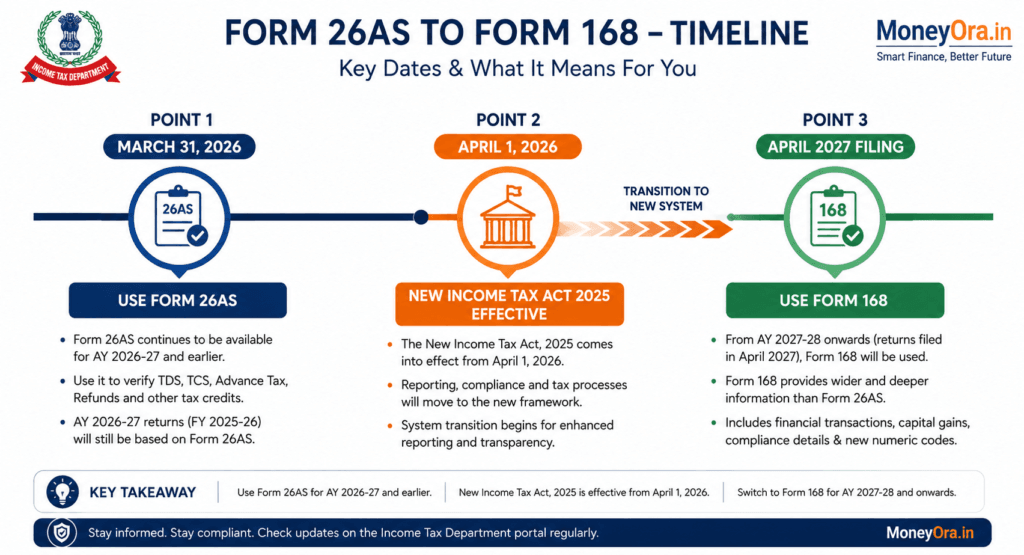
The Form 168 vs Form 26AS debate has one critical nuance that most people miss. This is not just a name change. Form 168 is also more comprehensive than Form 26AS. It includes a wider range of financial transaction data, compliance details, and uses an entirely new payment code system (codes 1001 to 1092) instead of the old section names like Section 194C or Section 194J.
Here is what Form 168 contains, prescribed under Rule 245:
- TDS and TCS deducted and deposited against your PAN
- Advance tax paid
- Self-assessment tax paid
- Regular assessment tax
- Refund details
- High-value financial transactions (SFT – Statement of Financial Transactions)
- Capital gains details
- Dividend income
- Compliance-related proceedings and demand status
- Any other information prescribed under the new rules
You do not prepare or file Form 168. The Income Tax Department generates it automatically based on data received from your employer, bank, mutual fund house, broker, and other reporting entities. It is uploaded directly to your registered account on the e-filing portal (incometax.gov.in).
Form 168 Tax Reconciliation Checker
Compare your Form 168 TDS with Form 16 or other TDS certificates and quickly identify a possible mismatch.
Form 168 vs Form 26AS: Key Differences
This comparison is what most people searching for “Form 168 vs 26AS” actually need. Here is a detailed side-by-side view.
| Feature | Form 26AS (Old) | Form 168 (New) |
|---|---|---|
| Governing Law | Income-tax Act, 1961 (Section 285BB, Rule 114-I) | Income-tax Act, 2025 (Section 510, Rule 245) |
| Applicable From | Up to Tax Year 2025-26 (AY 2026-27) | Tax Year 2026-27 onwards (AY 2027-28 onwards) |
| TDS/TCS Details | Yes | Yes (with new payment codes 1001-1092) |
| Advance Tax | Yes | Yes |
| Self-Assessment Tax | Yes | Yes |
| Refund Details | Yes | Yes |
| High-Value Transactions (SFT) | Limited | Expanded coverage |
| Compliance/Proceedings Status | No | Yes (pending/completed proceedings) |
| Capital Gains Details | No (was in AIS) | Included |
| Payment Code System | Old Section numbers (194C, 194J, 194I, etc.) | New numeric codes 1001-1092 (Sections 392, 393, 394) |
| TIS Integration | Separate | Unified view |
| Taxpayer Feedback | Via AIS separately | Integrated feedback mechanism |
| Download Location | TRACES / e-filing portal | e-filing portal (same login) |
If you are filing your ITR right now for income earned in FY 2025-26, you use Form 26AS, not Form 168. The transition to Form 168 applies only for income earned on or after April 1, 2026. Do not look for Form 168 in the portal for your current return – it will not exist for this assessment year.
Timeline: When Does Form 168 Apply?
This is where most of the confusion about Form 168 vs Form 26AS comes from. The timeline matters a lot.
| Financial Year | Assessment Year | Governing Act | Form to Use | ITR Deadline |
|---|---|---|---|---|
| FY 2025-26 | AY 2026-27 | Income-tax Act, 1961 | Form 26AS + AIS | July 31, 2026 |
| FY 2026-27 | AY 2027-28 | Income-tax Act, 2025 | Form 168 (new) | July 31, 2027 |
| FY 2027-28 onwards | AY 2028-29 onwards | Income-tax Act, 2025 | Form 168 | As notified |
The key rule: TDS deducted on or before March 31, 2026 falls under the old rules and shows in Form 26AS. TDS deducted on or after April 1, 2026 falls under the new Act and shows in Form 168 under the new payment codes 1001-1092.
This creates a practical issue for taxpayers with income straddling the April 2026 boundary – say, a salary paid partly in March and partly in April. Your tax documents will reference both systems during the transition period.
What Form 168 Shows That Form 26AS Did Not
The Form 168 vs Form 26AS difference becomes clearest here: the Form 168 AIS connection is far tighter than what existed before. Here is what actually expanded.
Two-Part Structure
Form 168 is divided into two distinct parts:
- Part A: Taxpayer profile – your name, PAN, address, date of birth, contact details, and identification information
- Part B: Tax, transaction, and compliance records – the actual financial and tax data
What is New in Part B
Form 26AS was primarily a tax credit statement. It told you how much TDS/TCS was deposited against your PAN. Form 168 goes further. It covers:
- Capital gains from securities, property, and mutual fund redemptions
- Dividend income reported by companies
- Foreign remittances and cross-border transactions
- Immovable property transactions above threshold
- Mutual fund purchases and redemptions
- Status of ongoing proceedings, demands, and refunds
- GST turnover (for business owners – helps catch discrepancies)
New Payment Codes 1001-1092 in Form 168
This is the part that is tripping up businesses, accountants, and salaried employees with complex income sources. In the Form 168 vs Form 26AS shift, the payment code overhaul is the biggest operational change – Form 168 uses a completely new numeric coding system that replaces all the old section names.
Under the Income Tax Act, 1961, TDS was reported by section name: Section 194C for contractor payments, Section 194J for professional fees, Section 194I for rent, and so on. From April 1, 2026, all of these section references are replaced by numeric payment codes 1001 to 1092, organized under three parent sections.
| Parent Section | Code Range | What it Covers | Old Equivalent |
|---|---|---|---|
| Section 392 | 1001-1004 | Salary TDS and specified senior citizen payments | Section 192, Section 194P |
| Section 393 | 1005-1038 (residents) 1039-1067 (non-residents) 1058-1067 (special) | All non-salary TDS on resident and non-resident payments | Sections 194C, 194J, 194H, 194I, 194Q, 194O, 195, etc. |
| Section 394 | 1068-1092 | Tax Collected at Source (TCS) | Sections 206C, 206CA |
Common Code Mappings You Will See in Form 168
| Old Section | New Code (approx.) | Payment Type |
|---|---|---|
| Section 192 (Salary) | 1001 | Salary payments |
| Section 194C (Contractors) | 1021 / 1022 | Payments to contractors |
| Section 194J (Professional) | 1027 | Professional and technical fees |
| Section 194H (Commission) | 1025 | Commission and brokerage |
| Section 194I (Rent) | 1030 / 1031 | Rent on land/building, plant/machinery |
| Section 194O (E-commerce) | 1035 | E-commerce operator payments |
| Section 195 (Non-residents) | 1039-1057 range | Payments to non-residents |
When you open Form 168 and see a four-digit code instead of a section name, do not panic. Cross-reference it with the mapping above. Most salaried taxpayers will only ever see codes in the 1001-1004 range (salary TDS) and a handful of 393 codes for bank interest, rent income, or professional work.
Form 168 vs AIS vs TIS: How They Work Together
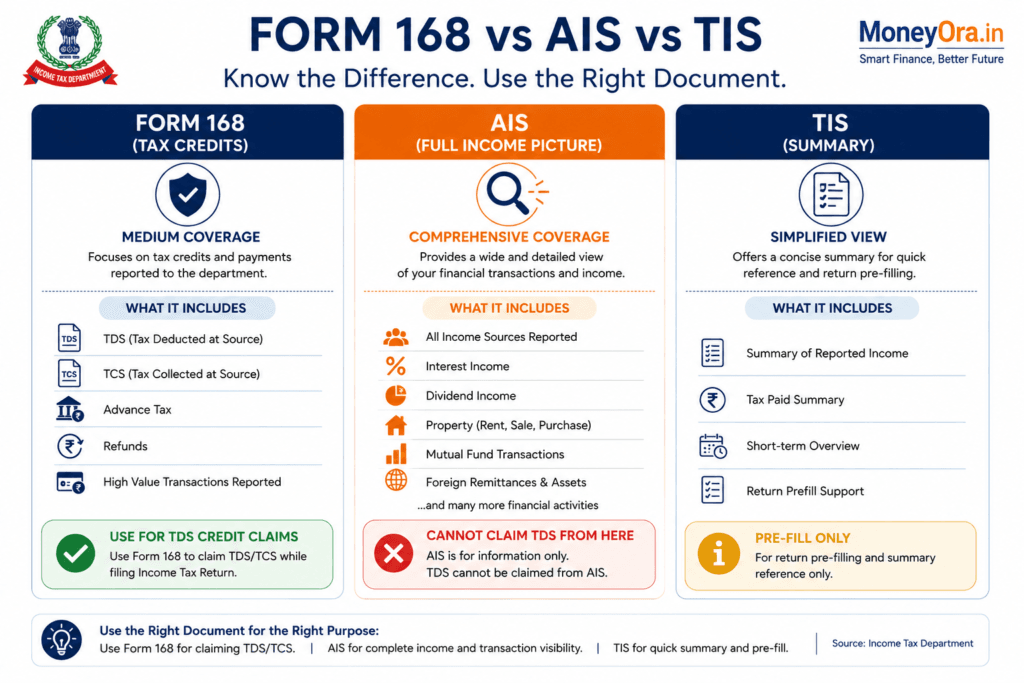
Once you understand Form 168 vs Form 26AS, the next layer is understanding where AIS and TIS fit in. This three-way comparison of Form 168 vs AIS vs TIS is where most taxpayers get tangled up. Each document has a specific purpose, and skipping one creates a gap in your reconciliation.
| Document | Primary Purpose | Who Should Check It | Can You Claim TDS From It? |
|---|---|---|---|
| Form 168 (formerly Form 26AS) | Official record of taxes deducted and paid against your PAN. Tax credit statement. | Every taxpayer, without exception | Yes – this is the only valid source for TDS credit claims |
| AIS (Annual Information Statement) | Broader financial picture: income, transactions, property deals, dividends, mutual funds. 26 categories of data. | Everyone, especially those with multiple income sources | No – cannot be used directly to claim TDS credit |
| TIS (Taxpayer Information Summary) | Category-wise aggregated summary of AIS. Used to pre-fill your ITR. | Useful as a quick cross-check during ITR filing | No – summary only, cannot be used for credit claims |
TDS credits can only be claimed based on Form 26AS (Form 168). If a TDS amount appears in AIS but not in Form 168, you cannot claim that credit. You must first ask the deductor to file a corrected TDS return, wait for Form 168 to update, and then file your ITR. Claiming TDS that is not in Form 168 will trigger an automated demand notice.
The correct order for tax reconciliation before filing:
- Check AIS first to catch all income the department knows about (salary, interest, dividends, capital gains)
- Submit AIS feedback for any wrong, duplicate, or missing entries
- Check TIS to see the pre-filled values the ITR portal will use
- Verify TDS credits in Form 168 – this is what determines how much tax credit you actually get
- Cross-check Form 168 against your Form 16/Form 130, Form 16A/Form 131, and bank statements
- Only then file your ITR
Understand how your investments affect your tax liability. Use MoneyOra's calculators to plan ahead.
SIP Calculator | FD Calculator | PPF CalculatorHow to Download Form 168
Accessing Form 168 uses the same login you use today for Form 26AS. The process is straightforward.
- Log in to the Income Tax e-Filing PortalGo to incometax.gov.in and log in using your PAN and password.
- Navigate to Form 168For Tax Year 2026-27 onwards: Go to e-File – Income Tax Returns – View Form 168 (AIS). For the current AY 2026-27 return: Go to e-File – Income Tax Returns – View Form 26AS.
- Select the Financial YearChoose the correct tax year. For Form 168, select Tax Year 2026-27 (covering income from April 1, 2026 to March 31, 2027).
- Download in PDF FormatClick Export as PDF to save a copy. The PDF is password-protected with your PAN in lowercase followed by your date of birth (DDMMYYYY format).
- Also Check AIS SeparatelyFrom the portal dashboard, go to Services – Annual Information Statement (AIS) to access the full AIS and TIS view. This is separate from Form 168
Check Form 168 at least twice before filing: once 30 days before the deadline to spot issues early, and once more 1-2 weeks before filing to catch any late updates from deductors. Banks and employers often file corrections close to the deadline, which can change the numbers in your Form 168.
Form 168 Mismatch: What To Do When Numbers Do Not Match
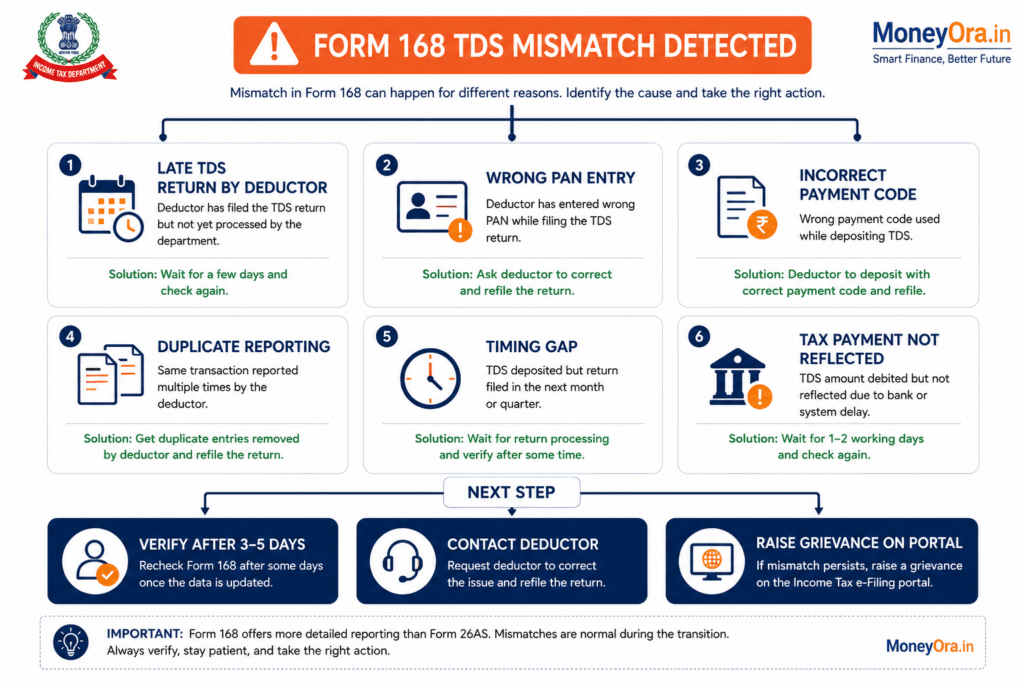
A Form 168 TDS mismatch is one of the most common reasons for ITR notices. Understanding the Form 168 vs Form 26AS transition helps here: many mismatches in 2026-27 will happen simply because deductors used the wrong payment code under the new system, not because of any real tax gap. But it does not always mean you made a mistake or owe more tax. Here is how to think through it.
Why Mismatches Happen
| Mismatch Type | Most Likely Cause | Who Needs to Fix It |
|---|---|---|
| TDS deducted by employer but not in Form 168 | Employer has not filed quarterly TDS return (Form 138) yet, or filed it late | Employer must file / correct Form 138 |
| TDS in Form 168 is lower than Form 16/Form 130 | Employer filed incorrect amount, or deduction not deposited on time | Employer to file correction in Form 138 |
| Unknown transaction in Form 168 | Reported under incorrect PAN, duplicate entry, or transaction by another entity | Submit AIS feedback, then cross-check with bank |
| TDS in Form 168 is higher than your records | Deductor filed under a different income code, or includes income you forgot to track | Verify with deductor, check all income sources |
| Advance tax not reflected | Challan deposit not processed yet, or wrong PAN on challan | Check OLTAS (Tax Payment Status) on TIN-NSDL, rectify if PAN error |
| Interest income higher in AIS than Form 168 shows | Below-threshold interest (no TDS), or bank reported without deducting TDS | You must still declare the income – only TDS credit is affected |
Do not file your return with inflated TDS claims just because your Form 16 shows a higher number. Claim only what appears in Form 168. Then report the balance TDS as income – because if it is not in Form 168, the Income Tax Department has no record of it being deducted. Meanwhile, ask the deductor to correct their filing so it appears in the next update.
Step-by-Step: Fixing a Form 168 Mismatch
- Do not panic and do not file immediatelyMost mismatches resolve once you understand the cause. Filing in a hurry with wrong TDS claims leads to demand notices.
- Contact the deductor (employer, bank, or other payer)Ask them to verify whether they filed the TDS return (Form 138/140) correctly and deposited the tax against your PAN.
- Submit AIS feedback on the e-filing portalFor incorrect income entries in AIS (not Form 168), use the Accept / Modify / Deny feedback options. This helps the department update their records.
- Wait for Form 168 to updateAfter the deductor files a correction, allow 7-15 working days for Form 168 to reflect the change.
- If deadline is near, file with correct information and claim only verified TDSYou can always file a revised return later once the correction comes through.
5 Mistakes Taxpayers Make with Form 168 (Form 26AS) Every Year
A lot of people lose money or get notices not because they are dishonest but because they misunderstand how these documents work. Here are the five most common ones.
Mistake 1: Relying on AIS Instead of Form 168 for TDS Claims
AIS shows more income data, so people assume it is more authoritative. It is not – for TDS credit purposes. In the Form 168 vs Form 26AS transition, this confusion got worse because AIS became more prominent in the portal. The Income Tax Department’s automated processing checks your TDS claim against Form 168, not AIS. If the numbers match AIS but not Form 168, you will get a demand notice for the difference.
Mistake 2: Not Checking Form 168 at All
Some people file purely from Form 16 without verifying it against Form 168. The problem: Form 16 is issued by your employer and reflects what they deducted. Form 168 reflects what they deposited against your PAN. These two can differ – and only what is in Form 168 matters for your credit claim.
Mistake 3: Confusing the Form 168 Transition Timeline
This is the biggest one in Tax Year 2026-27. The Form 168 vs Form 26AS transition has a very specific cutoff date – April 1, 2026 – and people searching for Form 168 for their current AY 2026-27 return (FY 2025-26 income) will not find it because it does not apply yet. For that return, you use Form 26AS and AIS. Form 168 becomes relevant for income earned from April 1, 2026 onwards, which you will file in 2027.
Mistake 4: Treating Every Form 168 Mismatch as a Tax Demand
A mismatch means there is a discrepancy between your records and what is in Form 168. It does not automatically mean you owe tax. It could be a timing issue, a deductor error, a duplicate entry, or a payment posted under the wrong PAN. Investigate before assuming the worst.
Mistake 5: Not Submitting AIS Feedback for Wrong Entries
Form 168 is auto-generated from third-party data. Sometimes a bank or mutual fund reports wrong amounts, or the same transaction appears twice. If you see something wrong in AIS (which feeds into the Form 168 ecosystem), submit feedback immediately. This updates the TIS values used to pre-fill your ITR.
What the Form 168 Transition Really Means for Indian Taxpayers
The Form 168 vs Form 26AS shift is not just a renaming exercise. It is part of a much larger move by the Income Tax Department toward a unified data infrastructure where they already know more about your finances than you might realize.
Form 168, under Rule 245, creates a single consolidated view that merges what used to require three separate checks: Form 26AS (tax credits), AIS (financial transactions), and compliance proceedings. The department has been quietly building this data lake for years through mandatory financial transaction reporting from banks, brokers, mutual funds, and property registrars.
What this means practically: the department’s information gap has been narrowing. They now have data on SFT transactions above threshold, your mutual fund redemptions, property purchases, and even some foreign remittances. Form 168 makes all of this visible to the taxpayer in one place – which is actually a good thing for honest filers, because it means fewer surprises at the time of scrutiny.
The risk for those who have historically under-reported income is obvious. But for the majority of salaried taxpayers, the bigger opportunity here is understanding the new payment code system (1001-1092). Each code maps to a specific type of income. If your deductor uses the wrong code, your TDS shows up in Form 168 under a different income category, which can create mismatches in automated ITR processing even when the total tax deposited is correct. This is a new category of Form 168 mismatch that did not exist under Form 26AS, and one that taxpayers need to start watching carefully from FY 2026-27 onwards.
The transition from Form 26AS to Form 168 is not a problem for compliant taxpayers. It is a problem for those whose employers, banks, or deductors are filing incorrectly – because the new system exposes those errors faster and more visibly than before.
For MoneyOra readers who are investors: pay close attention to how capital gains appear in Form 168. Under the new framework, capital gains from equity, debt, and property are included directly in Form 168 (they previously appeared in AIS separately). This means a broker who mis-classifies a transaction type can affect your tax credit reconciliation in ways that were not possible under the old Form 26AS structure.
Risks to Consider in the Form 168 vs Form 26AS Transition Period
- Deductor classification errors: A wrong payment code (say, 1027 instead of 1021) in the new system can cause your TDS to show under the wrong income category. The amount is correct but the context is wrong, which can trigger automated mismatches during ITR processing.
- Transition period confusion: During FY 2026-27, some deductors may still use old Section 194 references by mistake. Returns filed with wrong codes are considered defective, which means your TDS credit could be delayed.
- Late TDS return filing: Deductors have quarterly deadlines. If they file late, your TDS does not appear in Form 168 until the next update. This is especially common with smaller employers and individual deductors (landlords deducting TDS on rent).
- PAN mismatch at deductor level: If a deductor enters a wrong PAN while filing, the TDS goes against someone else’s PAN and not yours. You never see it in Form 168.
- High-value transaction reporting errors: Banks and registrars sometimes report property transactions or large deposits with slight errors. These appear in your Form 168 and can trigger letters asking for explanation.
Official Resources for Form 168 and Tax Filing
- Income Tax e-Filing Portal (incometax.gov.in) – Access Form 168, AIS, TIS and file your ITR
- TRACES Portal (tdscpc.gov.in) – Verify TDS credits, download TDS certificates, check challan status
- CBDT Official Notifications (cbdt.gov.in) – All official CBDT circulars on Form 168 and new payment codes
- TIN-NSDL Portal (tin.tin.nsdl.com) – Check advance tax and self-assessment tax payment status (OLTAS)
What You Should Do Right Now
The Form 168 vs Form 26AS question has a clear, practical answer depending on where you are in the tax filing cycle.
Filing for AY 2026-27 right now?
The Form 168 vs Form 26AS answer for you is simple: use Form 26AS and AIS. Form 168 does not apply to you yet. Focus on reconciling your TDS credits against Form 26AS, check AIS for any income you may have missed, and file before July 31, 2026.
Preparing for Tax Year 2026-27 (April 2026 income onwards)?
This is when Form 168 becomes your primary tax statement. Start understanding the new payment codes (1001-1092) and verify that your employer, bank, and other deductors have updated their systems to use the new codes correctly. A wrong code at the deductor’s end can create Form 168 mismatches even when the tax amount deposited is correct.
Found a mismatch?
Use the reconciliation checker on this page to identify the likely cause. Contact the deductor first, then submit AIS feedback where applicable, and file only with verified TDS credits.
Sources and References
- Income Tax Act, 2025 – Section 510, Rule 245 of Income-tax Rules, 2026 (official CBDT notification)
- CBDT Circular on TDS Payment Codes 1001-1092 (April 2026)
- Income Tax e-Filing Portal: incometax.gov.in – Form 168 FAQ section
- TRACES (TDS Reconciliation Analysis and Correction Enabling System): tdscpc.gov.in
- Business Standard: “Form 168 vs Form 26AS: What taxpayers need to know” (June 22, 2026)
- Ebizfiling: “Form 168 of Income Tax Act: Details, Uses and Process” (August 2026)
Frequently Asked Questions: Form 168 vs Form 26AS
Q1. What is Form 168?
Form 168 is discussed in the context of Tax Year 2026-27 and the updated tax-reporting framework. It can be used as a reference when reconciling your TDS and tax-credit information before filing your ITR.
Q2. What is Form 26AS?
Form 26AS is the Annual Tax Statement associated with your PAN. It contains important tax-related information, particularly TDS and TCS details, that taxpayers can use to verify their tax credits.
Q3. What is the difference between Form 168 and Form 26AS?
The main difference is how the tax and TDS information is presented under the applicable tax framework. Comparing the two records can help taxpayers identify differences in reported TDS and tax credits.
Q4. Is Form 168 the same as Form 26AS?
Form 168 and Form 26AS should not be treated as identical documents without checking the applicable rules for Tax Year 2026-27. Taxpayers should verify the information against their Form 16, TDS certificates and other official records.
Q5. Why should I compare Form 168 with Form 26AS?
Comparing your records can help identify TDS or tax-credit mismatches before filing your ITR. Finding discrepancies early gives you time to investigate the issue and contact the relevant deductor if necessary.
Q6. What should I do if Form 168 and Form 26AS show different TDS amounts?
First, check the financial year or tax year, PAN, deductor details and TDS amount. Then compare the information with your Form 16, Form 16A and other relevant documents. If the difference remains unexplained, contact the deductor for clarification.
Q7. Can a TDS mismatch affect my ITR filing?
Yes, a mismatch between the TDS claimed in your ITR and the tax credit available in the tax department’s records may require further verification. Reconciling your records before filing can help reduce the possibility of errors or tax-credit issues.
Q8. What is the role of Form 16 in Form 168 reconciliation?
Form 16 contains salary and TDS information provided by your employer. Comparing Form 16 with your relevant tax-credit records can help determine whether the TDS deducted from your salary has been correctly reported.
Q9. What if my employer deducted TDS but it is not showing in my tax records?
Check your Form 16 and the relevant tax-credit statement first. If the TDS amount is missing or incorrect, contact your employer and ask them to verify the TDS return, PAN details and amount reported.
Q10. What if Form 168 shows more TDS than my Form 16?
Review the additional TDS entry and identify its deductor or income source. It may relate to another source of income, such as bank interest, investments or another taxable transaction. Check your supporting financial records before taking any action.
Q11. What if Form 16 shows more TDS than Form 168?
Ask your employer or deductor to verify the TDS amount reported against your PAN. There may be a reporting, filing or updating issue that needs to be corrected.
Q12. Should I check AIS along with Form 26AS?
Yes. Reviewing AIS along with Form 26AS and your other tax documents can provide a broader view of the information reported against your PAN and help you identify discrepancies before filing your ITR.
Q13. Can I use the MoneyOra Form 168 Tax Reconciliation Checker?
Yes. The MoneyOra Form 168 Tax Reconciliation Checker allows you to enter your income and tax figures and compare the TDS shown in Form 168 with the TDS reported in your Form 16 or other TDS certificates.
Q14. Does a TDS mismatch automatically mean that I have to pay additional tax?
No. A mismatch does not automatically mean that additional tax is payable. You should first investigate the reason for the difference and reconcile your records with the relevant official tax information.
Q15. What documents should I check before filing my ITR?
You should keep your Form 16, Form 16A where applicable, Form 26AS, AIS, bank statements, investment statements and tax-payment records available. Comparing these documents can help identify errors before submitting your ITR.
Q16. What is the safest way to handle a Form 168 vs Form 26AS mismatch?
Verify the tax year, PAN, deductor, TDS amount and transaction details first. If the discrepancy cannot be resolved from your records, contact the relevant deductor or consult a qualified tax professional before filing your ITR.