
NPS Calculator – National Pension Scheme Calculator India (2026)
MoneyOra’s free NPS Calculator calculates your projected retirement corpus, monthly pension, and lumpsum withdrawal from the National Pension System. Enter your monthly contribution, current age, expected return, and annuity preference — the NPS pension calculator shows your exact numbers instantly. No login. No charge. EPF transfer guide for salaried employees
The National Pension System (NPS) was introduced to give Indian citizens a structured way to build a retirement corpus. how EPF vs PPF compares to NPS Anyone between 18 and 60 can contribute to an NPS account, and from age 60, the accumulated corpus becomes available. The tricky part is figuring out how much you’ll actually have. Complete financial planning framework. The returns depend on your contribution amount, the expected rate of return, the tenure, and how you split the corpus between annuity and lumpsum. This NPS calculator handles all of it.
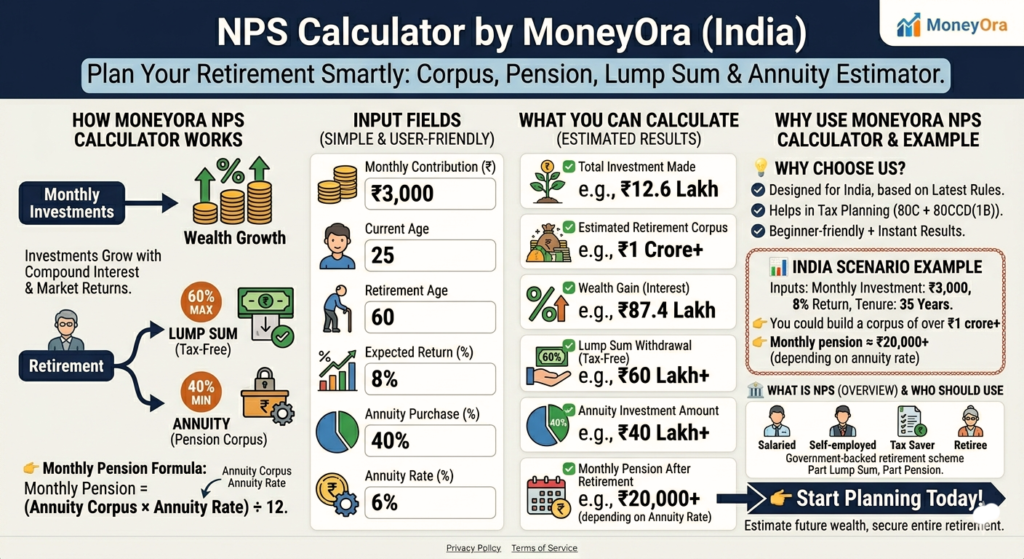
Table of Contents
What Is an NPS Calculator?
An NPS Calculator is a free online tool that calculates your projected retirement corpus under the National Pension System based on your monthly contribution, current age, expected rate of return, and how long you plan to contribute.
The National Pension System — previously called the National Pension Scheme — is a government-regulated retirement savings scheme open to all Indian residents between 18 and 60 years of age. Unlike a fixed deposit or PPF, NPS returns are market-linked. The corpus grows based on the scheme you choose and the performance of the underlying funds — equity, government securities, and corporate bonds. “EPF interest credited 2026 — check your PF balance too”
Because the returns aren’t fixed, planning around NPS requires projecting future values at an expected rate of return. That’s exactly what a national pension scheme calculator does — it compounds your monthly contributions forward to retirement age and shows you the resulting corpus, the lumpsum you can withdraw, and the estimated monthly pension from the annuity portion.
How Does the NPS Pension Calculator Help?
Most people underestimate how much they’ll accumulate in NPS — and a few underestimate how much they need. The NPS return calculator fixes both problems.
- It shows your total retirement corpus. Enter your monthly contribution, age, and expected return — the NPS corpus calculator tells you exactly how much you’ll have at retirement. No rough estimates, no approximations.
- It calculates the annuity split. At retirement, at least 40% of the NPS corpus must go into an annuity. The NPS annuity calculator shows you how much that 40% (or whatever ratio you choose) translates to as a monthly pension, based on your expected annuity rate.
- It shows your lumpsum withdrawal. The remaining 60% can be withdrawn tax-free. The NPS lump sum calculator shows this figure alongside the annuity corpus so you can see both at once.
- It handles step-up contributions. MoneyOra’s NPS investment calculator lets you model an annual increase in contributions — because most people earn more over time and can afford to contribute more each year.
- It estimates tax savings. NPS contributions qualify for deduction under Section 80CCD(1) up to ₹1.5 lakh and an additional ₹50,000 under 80CCD(1B). The calculator shows the estimated tax benefit alongside your corpus projection.
NPS Calculation Formula
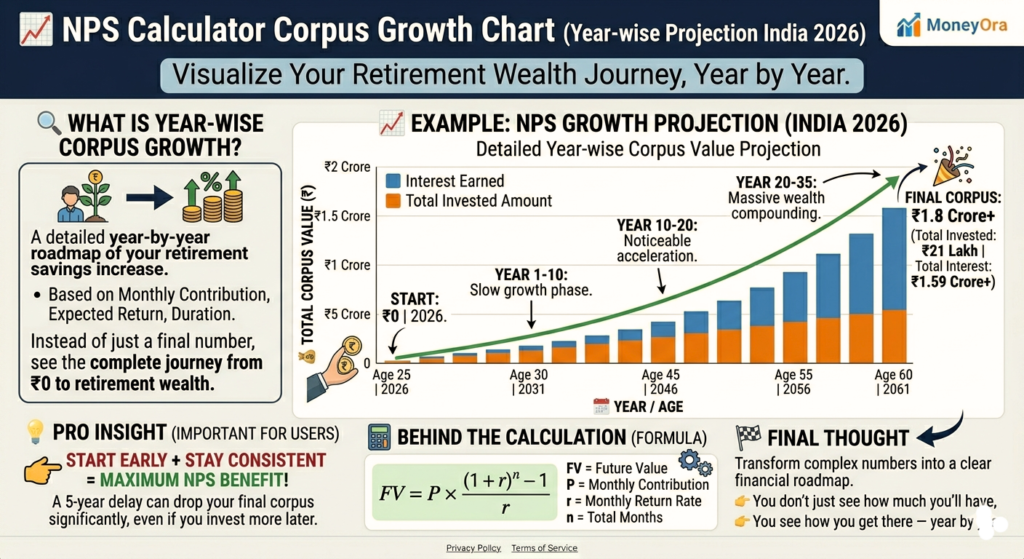
NPS uses compound interest to project corpus growth. The NPS calculator formula is:
A = P × (1 + r/n)nt
- A = Maturity amount (retirement corpus)
- P = Monthly contribution
- r = Expected annual rate of return
- n = Compounding frequency (monthly = 12)
- t = Investment tenure in years
The formula applies to each monthly contribution individually — the first contribution compounds for the full tenure, and the last one barely compounds at all. The national pension scheme calculator sums all of these up automatically.
Once the maturity corpus is determined:
- Annuity corpus = Total corpus × annuity purchase ratio (minimum 40%)
- Monthly pension = (Annuity corpus × expected annuity rate) ÷ 12
- Lumpsum withdrawal = Total corpus − annuity corpus
NPS Calculator Example
Let’s work through a real example to show how the NPS calculator with example works.
Inputs:
Current age: 34 years | Retirement age: 60 years
Monthly contribution: ₹3,000 | Expected ROI: 10% p.a.
Annuity ratio: 40% | Expected annuity rate: 6%
| Output | Amount |
|---|---|
| Investment tenure | 26 years |
| Total principal invested | ₹9.36 lakh |
| Projected corpus at 60 | ₹44.35 lakh |
| Lumpsum withdrawal (60%) | ₹26.61 lakh (tax-free) |
| Annuity corpus (40%) | ₹17.74 lakh |
| Estimated monthly pension | ₹8,870 / month |
₹3,000 per month for 26 years, at 10% expected return, becomes a ₹44 lakh corpus — that’s ₹35 lakh in growth on top of ₹9.36 lakh invested. The power here is the compounding over a long tenure, not the monthly amount.
Try the same inputs in MoneyOra’s NPS return calculator above and adjust the expected ROI between 8% and 12% to see how sensitive the corpus is to that assumption — the difference between 8% and 10% over 26 years is substantial.

How to Use MoneyOra’s Free NPS Calculator
The NPS monthly pension calculator on MoneyOra takes just a few inputs:
- Subscriber Sector: Select Government, Non-Government, or NPS Vatsalya (for minors). This determines the available scheme options.
- Scheme: Choose your investment scheme — Central Government, State Government, 100% G-Sec, Life Cycle 25 (conservative), Life Cycle 50 (moderate), or Active Choice.
- Date of Birth: Enter your date of birth. The calculator derives your current age and remaining investment tenure automatically.
- Existing NPS Tier 1 Corpus: If you already have an NPS account, enter the current corpus. Leave at ₹0 if you’re starting fresh.
- Monthly Contribution: Enter your total monthly contribution — employer + employee + voluntary.
- Retirement Age: Set the age until which you plan to contribute (60–75 years).
- Defer Withdrawal Age: Set the age when you want to start receiving monthly pension (between retirement age and 75).
- Annual Increase in Contributions: Enter the % by which you plan to increase contributions each year. Even 5% annually makes a significant difference over 20+ years.
- Expected ROI: Enter your expected annual return (5%–15%). Government scheme funds have historically returned 9%–11%; equity-heavy active choice portfolios can vary more.
- Annuity Ratio: Choose what % of the corpus to put into annuity (minimum 40% mandatory). The rest is your tax-free lumpsum.
- Expected Annuity Rate: Enter the annuity rate you expect at the time of exit (currently around 5.5%–7% from most annuity providers).
Results update instantly. You’ll see your projected corpus, lumpsum withdrawal, monthly pension, year-by-year growth chart, and full corpus breakdown.
NPS Tax Benefits Under 80CCD – What You Actually Save
NPS has one of the most generous tax benefit structures among retirement instruments in India. The NPS tax benefit calculator estimates these for you, but here’s how the three layers work:
| Section | Deduction limit | Who can claim |
|---|---|---|
| 80CCD(1) | Up to ₹1.5 lakh (within 80C limit) | All NPS subscribers |
| 80CCD(1B) | Additional ₹50,000 (over 80C) | All NPS subscribers |
| 80CCD(2) | Employer contribution (up to 14% of salary for Govt, 10% for private) | Salaried employees |
At a 30% tax slab, the additional ₹50,000 deduction under 80CCD(1B) alone saves ₹15,000 in tax every year. Over 25 years, that’s ₹3.75 lakh saved in tax — not counting the returns that money would have earned if invested instead of paid as tax.
For the full list of deductions and how NPS interacts with other 80C instruments, the Income Tax India portal’s deduction guide has the complete breakdown.
NPS Withdrawal Rules — What You Need to Know Before You Retire
The NPS maturity calculator shows gross corpus — but what you actually receive depends on the withdrawal rules. Here’s what applies:
- At age 60 (normal exit): Minimum 40% of corpus must be used to purchase an annuity. The remaining 60% can be withdrawn as a lumpsum and is completely tax-free.
- If corpus is under ₹5 lakh: You can withdraw the entire amount as a lumpsum — no mandatory annuity purchase.
- Premature exit (before 60): Only 20% can be withdrawn as lumpsum. 80% must go into annuity. This is why NPS works best as a long-term commitment.
- Monthly pension from annuity: The annuity corpus is used to purchase an annuity plan from an IRDAI-approved insurer. The monthly pension amount depends on the corpus size and the annuity rate at the time of purchase — not a fixed rate decided today.
- Tax on monthly pension: The lumpsum withdrawal is tax-free. The monthly pension received from the annuity is taxable as income, at your applicable slab rate.
For the official PFRDA guidelines on exit and withdrawal, the PFRDA withdrawal rules page has the full details including partial withdrawal criteria.
NPS vs PPF – Which One Works Better for Retirement?
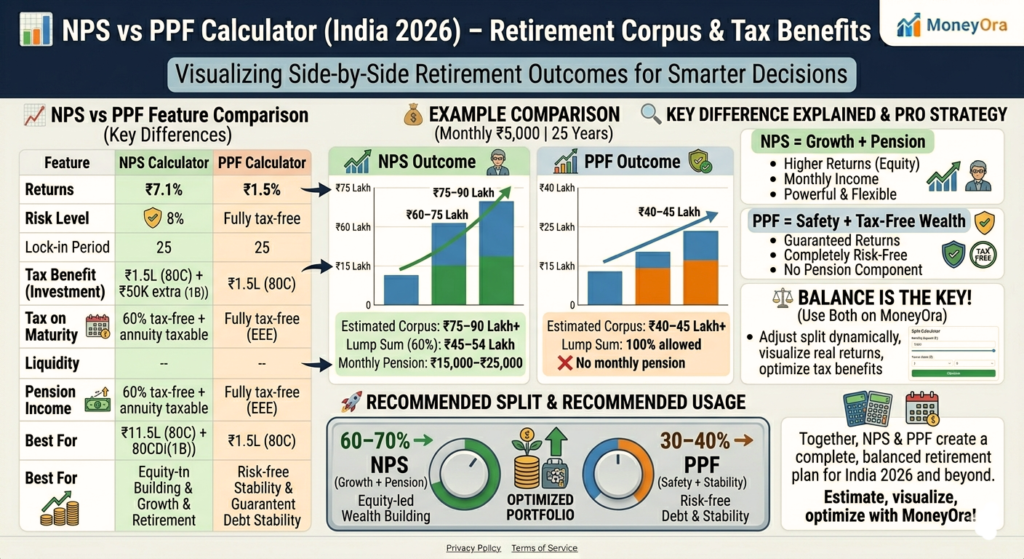
This is the comparison most people actually need to make. Both are government-backed retirement instruments. Both have significant tax benefits. But they work very differently.
| Factor | NPS | PPF |
|---|---|---|
| Returns | 8%–12% (market-linked) | 7.1% (government-fixed) |
| Risk | Low to moderate | Zero |
| Lock-in | Until age 60 | 15 years |
| Tax on maturity | 60% tax-free lumpsum; pension taxable | Fully tax-free (EEE) |
| Additional 80C benefit | Extra ₹50,000 under 80CCD(1B) | Within ₹1.5L 80C limit |
| Flexibility | Active choice of allocation | Fixed rate, no choice |
| Best for | Higher long-term returns, extra tax saving | Guaranteed, fully tax-free corpus |
Most financial advisors recommend holding both — PPF as the guaranteed, fully tax-free base, and NPS for the additional 80CCD(1B) deduction and potentially higher market-linked returns. Use MoneyOra’s PPF Calculator alongside this NPS calculator to compare the maturity values side by side for your specific numbers.
Getting More From Your NPS — Practical Tips
- Use the additional ₹50,000 deduction every year. Section 80CCD(1B) gives you a deduction over and above the ₹1.5 lakh 80C limit. At a 30% slab, that’s ₹15,000 saved annually. Most people leave this on the table. The NPS tax calculator shows this benefit clearly — don’t ignore it.
- Start early. The difference is not linear. A 25-year-old contributing ₹5,000/month to NPS at 10% will have roughly ₹1.9 crore at 60. A 35-year-old contributing the same amount will have around ₹68 lakh. Same monthly amount, same rate — the 10-year head start almost triples the outcome. Use the NPS calculator with salary inputs to model your own timeline.
- Step-up contributions matter more than you think. Increasing contributions by just 5% annually — in line with typical salary growth — dramatically changes the maturity corpus. MoneyOra’s NPS calculator with step-up contribution models this for you.
- Tier 1 vs Tier 2 — know the difference. Tier 1 is the mandatory locked account with tax benefits. Tier 2 is a voluntary account with no lock-in but also no tax deduction. This calculator covers NPS Tier 1 — the one that builds your retirement corpus.
- Government employees: check employer contribution. For central government employees, the employer contributes 14% of basic salary + DA to NPS. This goes into your corpus but isn’t counted in the 80CCD(1) limit. It’s additional money compounding in your account. The NPS calculator for government employees accounts for existing corpus — enter your current Tier 1 balance from your NPS account statement.
- Don’t set annuity ratio at exactly 40%. Yes, 40% is the mandatory minimum — but that means 60% comes out tax-free as lumpsum. Unless you genuinely need a higher monthly pension and have no other retirement income, keeping the annuity ratio at 40% gives you the most tax-free money. Use the NPS annuity calculator to see how the monthly pension changes as you adjust the ratio.
Other calculators on MoneyOra for retirement and investment planning:
- PPF Calculator — tax-free guaranteed returns with EEE benefit
- FD Calculator — fixed deposit maturity and amortization schedule
- RD Calculator — recurring deposit maturity calculator
- EMI Calculator — plan loan EMIs alongside retirement savings
Lorem ipsum dolor sit amet, consectetur adipiscing elit. Ut elit tellus, luctus nec ullamcorper mattis, pulvinar dapibus leo.
Before You Open That NPS Account
NPS is a long commitment — you’re locking money away until 60, with limited access before that. The upside is the compounding over 20–35 years and the additional tax deduction that no other instrument offers.
The numbers work best when you start early, increase contributions with your income, and don’t touch the corpus before retirement. Use MoneyOra’s NPS calculator above to model your specific scenario — try different contribution amounts, expected returns, and annuity ratios before you decide.
If you’re also holding or planning PPF, compare the two side by side with the PPF Calculator on MoneyOra. The right answer for most people is both — not either/or.
Lorem ipsum dolor sit amet, consectetur adipiscing elit. Ut elit tellus, luctus nec ullamcorper mattis, pulvinar dapibus leo.
Frequently Asked Questions About NPS Calculator
An NPS Calculator is a free online tool.
It calculates your projected retirement corpus.
It also shows your monthly pension.
It estimates your lumpsum withdrawal.
These are based on your monthly contribution.
Your current age is also considered.
It uses your expected rate of return.
Your annuity preferences are also included.
MoneyOra's national pension scheme calculator covers all NPS subscriber sectors.
This includes Government, Non-Government, and NPS Vatsalya.
The NPS calculator uses compound interest.
It projects your monthly contributions forward.
This continues until your retirement age.
It uses your expected rate of return.
Once the total corpus is calculated, it is split.
The split is based on your annuity ratio.
At least 40% goes into annuity.
This generates your monthly pension estimate.
The remaining 60% is tax-free lumpsum.
Enter your inputs and results update instantly.
NPS returns are calculated using compound interest.
The formula is A = P × (1 + r/n)^nt.
P is your monthly contribution.
r is the expected annual return.
n is the compounding frequency.
t is the tenure in years.
Each monthly contribution compounds differently.
The first compounds for the full tenure.
The last compounds for a shorter duration.
The NPS return calculator sums all automatically.
It shows the final corpus.
An annuity is a monthly income stream.
It is purchased from an IRDAI-approved insurer.
This is done using a portion of your NPS corpus.
At least 40% must be used for annuity.
This generates your monthly pension.
The amount depends on corpus size.
It also depends on annuity rate.
The rate is decided at the time of exit.
The annuity income is taxable.
Your pension depends on your total corpus.
It also depends on annuity allocation.
The minimum allocation is 40%.
The annuity rate also matters.
Current rates are around 5.5%–7%.
Use the NPS monthly pension calculator.
Try different scenarios.
Change contribution, tenure, and annuity rate.
See how your pension changes.
It depends on your financial needs.
EPF offers fixed returns.
The rate is government-set.
Currently it is around 8.25%.
EPF is tax-free after 5 years.
NPS is market-linked.
It may give higher long-term returns.
Only 60% is tax-free.
Annuity income is taxable.
NPS gives extra ₹50,000 tax benefit under 80CCD(1B).
Most salaried people use both EPF and NPS.
NPS offers multiple tax deductions.
Section 80CCD(1) allows deduction up to ₹1.5 lakh.
This is within the 80C limit.
Section 80CCD(1B) gives extra ₹50,000 deduction.
This is above 80C limit.
Section 80CCD(2) covers employer contributions.
This is up to 14% for government employees.
It is up to 10% for private employees.
At 30% tax slab, ₹50,000 saves ₹15,000 tax.
The minimum contribution is ₹500.
The yearly minimum is ₹1,000.
This keeps your account active.
There is no upper limit.
Tax benefit limits still apply.
Use the NPS investment calculator.
See how ₹500/month grows over time.
No. NPS is uniform across India.
Returns do not depend on city or state.
This is a common misconception.
The results depend only on your inputs.
These include contribution, return, tenure, and annuity.